Fall 2016 Solar Panels: Motor Trade-Off Study

By Jose Rodriguez (Electronics and Control)

Approved By Inna Echual (Project Manager)

ObjectiveMotors we need to select must be able to hold the panel at different angles with precision with maximum 12 volts and 2 amps to fulfill the sun tracking requirement. In order to do this, a minimum torque of 50 oz/in is required based on our calculations. 

Stepper Motor:

Need to consider the positioning resolution because the number of steps per revolution range from 4 to 400.

Note: Resolution is expressed in degrees. Example- 1.8⁰ is 1.8360= 200 step/rev motor

  • Higher resolution torque effects the speed and torque by decreasing both as resolution increase
  • Gearing can help to increase resolution without having to loose torque
  • In addition, torque can be increased, but the tradeoff will be speed

Pros

  • Precise positioning
  • Low Speed Torque

Cons

  • Low Efficiency- draw the most current when not doing any work
  • Less Torque at high speed
  • No feedback- Limit switches or detectors typically required for safety and establishing a reference position
  • Require a stepper controller to energize
  • Cost more
  • Four inputs

DC Motor:

Pros

  • Cheap
  • Efficient
  • Can be controlled using an H-Bridge circuit
  • Only need two inputs

Cons

  • Can’t be used for precision
  • Noise is introduced if not brushless
  • Brushless DC motors- require a separate controller, ESC

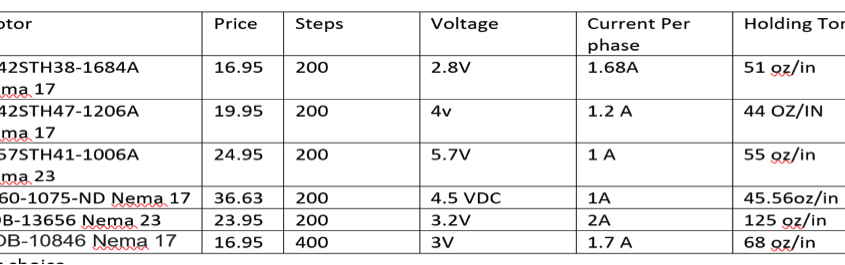
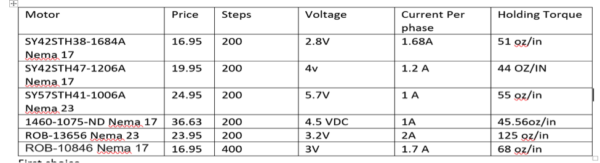
Based on the two key differences on these two motors, we concluded that we will need to use 2 stepper motors to control the sun tracking on the solar panels. Precision is needed and the stepper motor is the only motor that can be controlled to fulfill that precision requirement. In addition, a constant-holding torque is required to hold the panels and the stepper motors are able to provide this. Since the other panels do not require any precision or holding torque, DC motors are more acceptable to be used than stepper motors. The following table shown in Figure 1 will show the motors that I compared and based on my needs I picked one of the 6.

untitled2

Figure 1: Stepper Motor Comparisons

Final Decision:

The final decision for making the sun tracking possible are the two stepper motors SY57STH41-1006A. They are my choice because it draws only 1 amp and has a holding torque of 55 oz/in, which is required to articulate the panels efficiently.


Sensors for no load condition Trade-Off Study

By Jose Alcantar, Electronics and Controls

A set of different types of sensors were considered for detecting no load conditions on the Pathfinder, these include:

Current Sensors: These type of sensors allow the user to monitor the current draw on each of the motors.

Flex Sensors: This type of sensor measures the deflection caused by bending of the sensor.

Pressure Sensor: This sensor typically measures the pressure of gases.

Micro switch:  This type is a switch that is actuated by physical force

Each of these types of sensors presented both pros and cons when deciding on which to implement on the pathfinder. Starting with the flex sensor, the proposed idea was that as the pathfinder was traveling the suspension system would move and bend as the rover drove along. As soon as one of the wheels came off the ground, the flex sensor would detect this and shut off power to the motor. The biggest problem in implementing this idea is that the rocker bogie system does not bend while it is driving. This makes the sensor in the field unreliable.

The idea with the pressure sensor was that the pressure in the tires would be measured. This would be beneficial if the rover had air-filled tires, which would detect when the tires would come off the ground. With the new design of the rover, this would become an issue due to the use of foam-filled tires.

Similar with the flex sensor, the micro switch would detect any force on the sensor if the suspension lifted a tire off the ground. The problem with this is with the design of the rover, there would be no suitable areas to mount the sensor on the pathfinder.

The best option for the rover were the current sensors. Due to the current draw of each of the motors, a current sensor can be wired in series with the motor to measure the current. Of the different types of current sensors, two were selected as the best options. The two options were the use of a 0.51Ω current sensing resistor and the Adafruit INA219.

When considering the two options the main differentiator between the two was the cost. The Adafruit INA219 has a total cost of $9.95 and multiplying by six (one for each motor) the total comes out to about $60. The shunt resistor has a cost of about .56 cents each, the total coming out to being about $3.50. Another benefit of using the shunt resistor is the fact that the motor shield being used has a pin output specifically for the use of current sensing resistors. Ultimately, the shunt resistor appears to be the best option due to the cost, the easy implementation, and least use of pins.

Motor Shields Trade-Off Study

By: Nick Lukin (Manufacturing and Design Engineer)

Two motor driver shields were taken into consideration for the Pathfinder Project, the Pololu VNH 5019 and the Adafruit V2.3. Each shield had its own pros and cons and there were a variety of factors that needed to be taken into consideration during the evaluation process. The figure below shows a comparison of both boards.

motorshield-tradeoff

Table 1: Comparison of Polulu VNH 5019 and the Adafruit V2.3

Continuous and Peak current capabilities of each driver shield were evaluated in order to find out what each shield could handle. The motors that we chose to use are 12 volt DC worm gear motors. These motors have a no load current of 0.96 A, a full load current of 1.8 A, and a stall current of 4.8 A. The Pololu VNH 5019 can handle the loads of the motors while the Adafruit V2.3 cannot. The next factor considered was the number of pins used for communication between the Arduino Leonardo and each shield. The Pololu VNH 5019 requires a minimum of 6 pins to control 2 motors. In order to separately control each motor (6 motors) a total of 18 i/o pins would be needed and the Leonardo only has 20 i/o pins total. This creates an issue because pins will also be used to control servos and take in sensor inputs. The Adafruit V2.3 uses i2c for communication and therefore will only require two pins from the Leonardo (SCL and SDA). The next factor taken into consideration was the additional features that each board offered. The Pololu VNH 5019 has built in current sensors that could be used to meet the requirement of stopping each motor under no load conditions while the Adafruit V2.3 has built in servo control that could be used for the pan and tilt mobile phone holder. Each shield has its pros and cons but ultimately we chose to go with the Pololu VNH 5019 because it can handle the load of the DC motors that we plan to use. It is necessary for us to keep the motors that are presently on the Pathfinder because they can handle the heavy weight of the chassis and solar panels. In order to solve the pin issue associated with the Pololu VNH 5019 we plan to use a MCP23017 – i2c input/output port expander. This port expander will give us an additional 16 pins. Our design will use 3 Pololu VHH 5019 motor shields stacked on each other to drive 6 motors. We will also be able to utilize the built in current sensors in order to stop our motors under no load conditions.

SVN Blog Post – Prosthetic Arm Fall 2016

The team is using SVN -a Windows shell extension, to keep track and share all the designs, code, presentations and documentation of the project. Although the team is still getting familiar to the way the shell documents files, it seems to work fine. It has almost the same functionality as Google Drive or Dropbox with the only difference that SVN maintains the current and historical version of the files any of members “commit”.

Our Control and Electronics Engineer, Fabian Suske gave us a quick and easy workshop on how to get started. So, the following post is something he prepared to share with us and with the arxterra community.

By Fabian Suske.

Table of Contents

What is SVN?

SVN is a revision based file sharing platform. Ideal for group projects. Every change will be saved and can be restored. So old versions can be restored if desired. SVN is especially helpful if more than one person is working on the same file or file group (e.g. Code).

SVN makes sure that no changes of one person are lost if a second one overrides the file because they worked on the same file at the same time. It also provides a merge tool for such a case.

In contrast to other file exchange platforms like Google Drive or OneDrive files are not automatically synced. The user has to actively sync the files (commit). This ensures that only working copies are stored on the platform.

SVN will be used to track the project process as well as a save file exchange platform. Especially in the manufacturing subsystem it will make cooperation easy.

SVN getting started

What you need:

A repository (server) is needed. A repository can be bought only or can be setup manually on a server. But the own server needs a static IP-Address and a DNS entry. Every revision is stored on the repository host. So large files or rapidly changing files (e.g. log files) are not designed to track with SVN.

To connect to the repository you need a client. I personally use TortoiseSVN.

You also need an account on the repository.

https://tortoisesvn.net/downloads.html

There are clients for MAC but I don´t know them


Setting up a folder:

To interact with the repository you need to create a folder where ever you want your files to be. After you installed your client you should be able to right click on the folder you just created and select SVN Checkout

figure-1

Then under URL enter the Repository URL:

figure-2

You can then enter your User name and Password. Check “Save authentication”.

The program then downloads every file up to this point (revision).

Check for changes:

Before you start working you need to make sure you have the newest version. To do so select SVN Update from the context menu

figure-3

Modifying or adding a file:

Save or copy a file in the SVN folder. If you’re done with your work (working pieces only) right click on the folder and press SVN Commit

figure-3

Select all files that you’ve modified, created, deleted or added. If you just read something to don´t need to tick it.

Don’t forget to add a detailed description of what you’ve done! You don’t need to add details such as your name or the date. SVN will add such details on its own.

To commit it is important that you right click the folder icon. If you inside the folder you won’t see the context menu. Just go one folder up.

figure-4

Deleting a file:

SVN sometimes has a problem when you just delete files with your windows command. To delete a file right click it and select tortoise SVN and then select delete

figure-5

Override protection

To make sure nobody overrides your stuff while you working on it you should lock it.

Select TortoiseSVN and then Get Lock

figure-6

The lock will be released once you committed your work.

Project revision

If you select Show log from the context menu a GUI will popup showing every step that has been committed.

figure-7

Above you can see such a log. SVN provides you with revision number, the actions that happened (added/modifies/deleted), the person how changed it and the date.

It also provides a description message what has been done in this revision as well as a list of what action happed to every affected file.

We documented this workshop in Minutes 04

Preliminary Project Plan

Sabina Subedi (Project Manager)

Adan Rodriguez (Mission, Systems & Test)

Jose Alcantar (Electronics & Controls)

Nick Lukin (Design & Manufacturing)

Table of Contents

Work Breakdown Structure (WBS)

By Sabina Subedi (Project Manager)

The WBS shows all the work that is to be completed by the Pathfinder – Chassis group. The WBS is arranged into three main sections or divisions – Mission Systems & Test, Electronics & Controls and Design & Manufacturing, where each section is a responsibility of the corresponding division member. The three sections are then divided into various groups, which include specific sets of tasks that are relevant to the group.

wbs

Figure 1: Work Breakdown Structure

Project Schedule

By Sabina Subedi (Project Manager)

Top Level Schedule

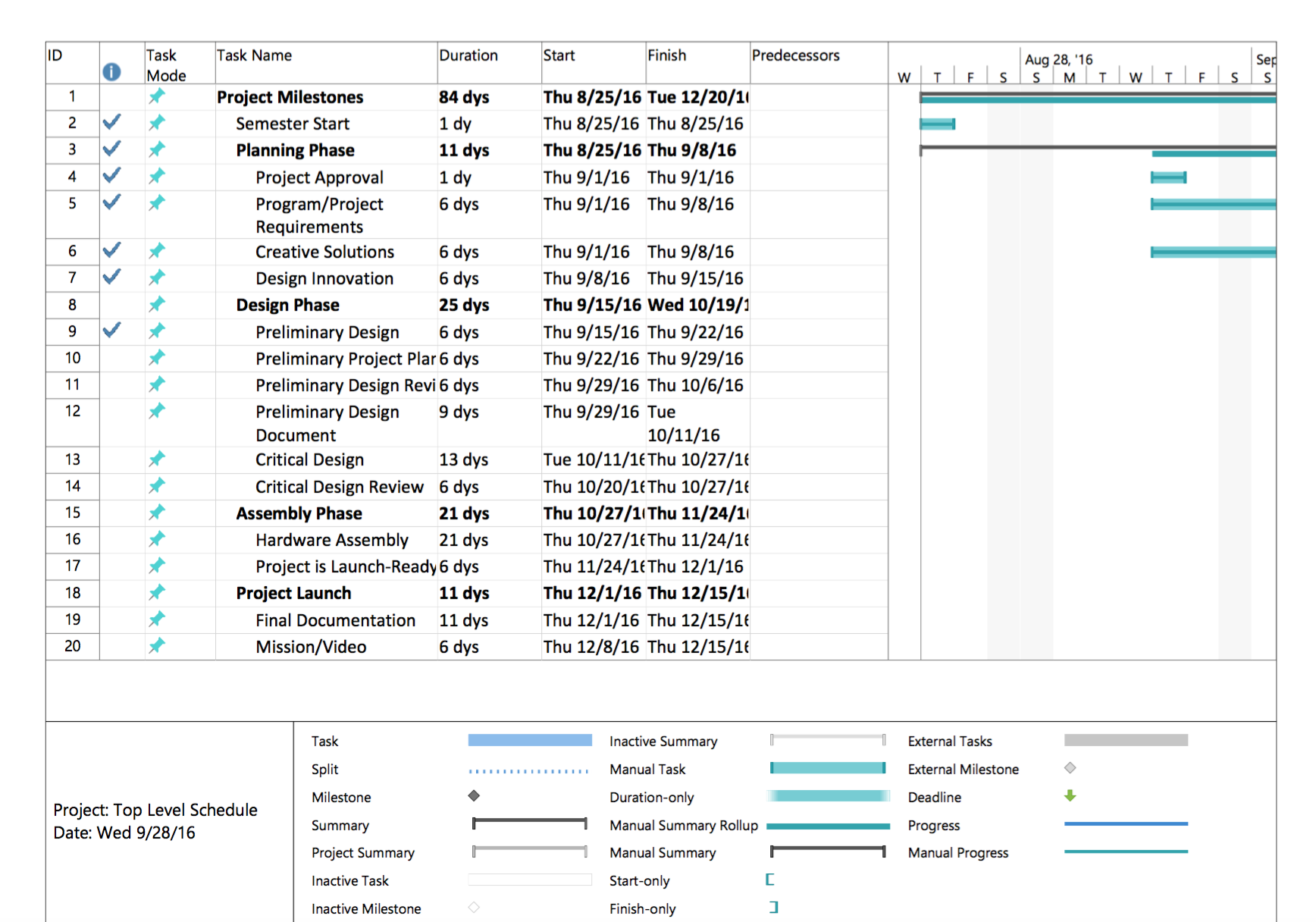
The top level schedule below was created using the generic schedule provided on the class website. This schedule consists of all tasks that are to be completed before the end of the semester, December 15th, 2016. The project milestones are broken down into four phases: Planning, Design, Assembly and Project Launch. The tasks within the different phases are then divided up by the divisions.

top-level-schedule-generic

Figure 1: Top level schedule (Generic)

System/Subsystem level tasks

The generic top level schedule was then modified to include all system/Subsystem level tasks in accordance with the WBS above. All division members are assigned specific tasks that they are responsible for, per “Job Descriptions” document available on the class website. Main tasks then were broken down into sub-tasks, if applicable. All tasks include start and finish dates, as well as percent complete. Blue check mark denotes tasks that are 100% complete.

schedule-1 schedule-2 schedule-3 schedule-4

Figure 2: Schedule including System/Subsystem level tasks

Burn Down and Project Overview

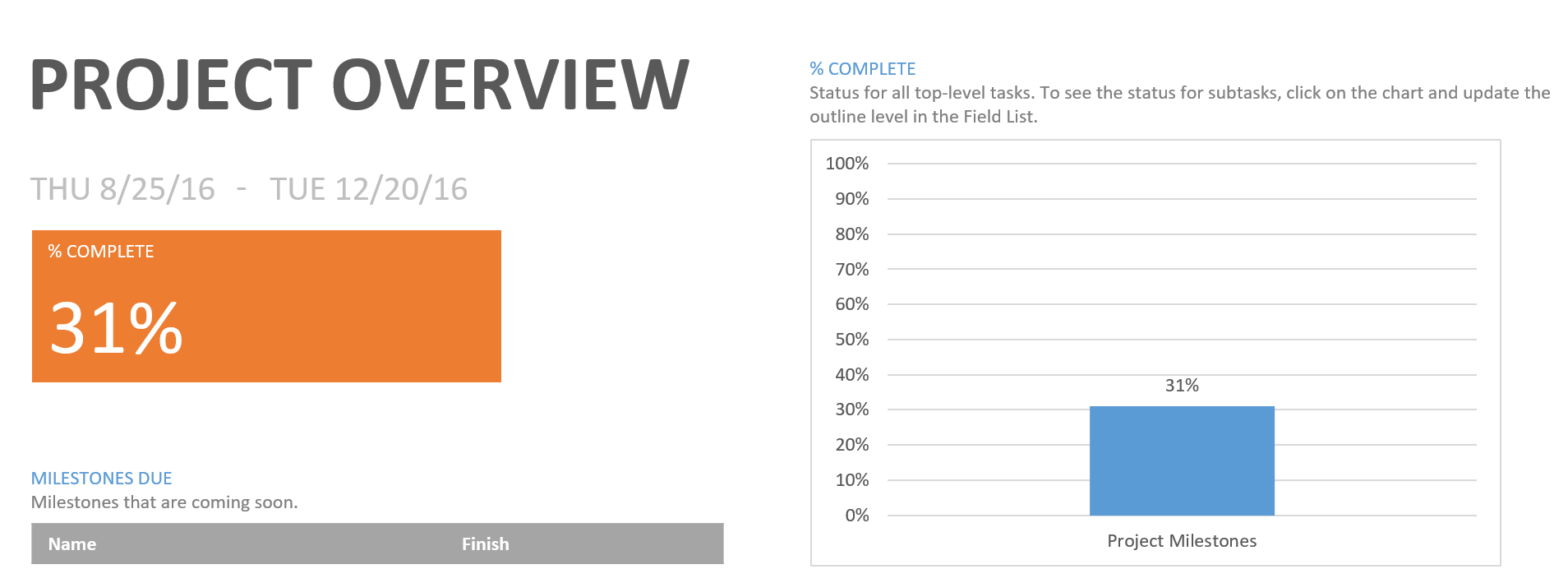
The burn down chart below shows how many tasks are completed and how many are left. The project overview graph shows the percent completed as of today, September 29th 2016.

burndownpercent-complete

Figure 3: Task burndown chart along with project overview graph

System Resource Report

By Adan Rodriguez (Mission Systems and Test Engineer)

Cost Allocation Report

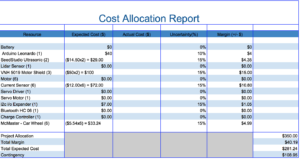
This cost report is a rough estimate of the expected cost of each component on the Pathfinder. Our expected prices for each item excluded tax and shipping price. Tax and shipping prices were included in the Uncertainty category. Some of the items were marked at $0 for expected price because the item was either already on the Pathfinder from previous semester or the item was given to the team. Since there is no budget requirement, the Project Allocation was determined by adding up the expected price of each item and choosing an amount slightly higher than the total expected price.cost-allocation

Figure 4: Cost Allocation Report

Power Allocation Report

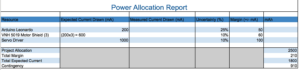
This power report displays the expected current drawn by each component that will be drawing power from the battery. The team had trouble identifying the current that would be drawn by the VNH 5019 motor shields. For now we have used rough estimate of the current drawn by the VNH 5019 motor shield by using the same current rating of the Arduino Leonardo. The battery being used on the Pathfinder has a power rating of 10,000 mAh. We considered the 4 hour duration of the mission in order to come up with the Project Allocation value. We simply divided the power rating of the battery by 4 in order to come up with a Project Allocation of 2,500 mAh.

power-allocation

Figure 5: Power Allocation Report

Mass Allocation Report

This mass report is a rough estimate of the expected weight of each component on the Pathfinder. Some of the expected weight values are rough estimate because some of the item weight values were tough to find. Rough estimates were made relative to similar size of items. For example, the SeedStudio Ultrasonic sensors were estimated to weigh a fraction of the weight of the VNH 5019 motor shield because we had accurate weight values for the motor shields. The Mass Allocation Report will be updated once we actually weigh items with a scale. Since there is no weight requirement, the Project Allocation was determined by adding up the expect weight of each item and choosing an weight slightly higher than the total expected weight.

mass-allocation

Figure 6: Mass Allocation Report

Project Cost Estimate

By Sabina Subedi (Project Manager)

The total expected cost is $281.24, based on the cost allocation provided above. The cost allocation report consists of rough approximations of the expected cost of each component. The components listed have not been purchased. Further trade-off studies are to be done before any purchases are made. Therefore, the total estimated cost is subject to change as the project progresses.

Source Material:

Preliminary Project Plan: http://web.csulb.edu/~hill/ee400d/Documentation%20Lecture%20Series/05%20Preliminary%20Project%20Plan.pdf

Generic Schedule: http://web.csulb.edu/~hill/ee400d/Lectures/Week%2005%20Project%20Plans%20and%20Reports/c_Generic%20Schedule.pdf

Job Descriptions:

http://web.csulb.edu/~hill/ee400d/Lectures/Week%2001%20Welcome/c_Job%20Descriptions.pdf

Resource Report:

http://web.csulb.edu/~hill/ee400d/Lectures/Week%2005%20Project%20Plans%20and%20Reports/d_How%20to%20Write%20a%20Resource%20Report.pdf

Fall 2016 Velociraptor (W) Preliminary Project Plan

By: Lam Nguyen (Project Manager)

        Hal Vongsahom (System Engineer)

Table of Contents

Work Breakdown Structure (WBS)

By: Lam Nguyen (Project Manager)

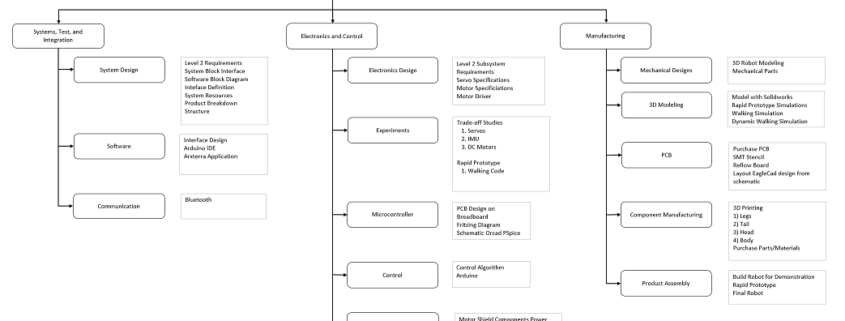
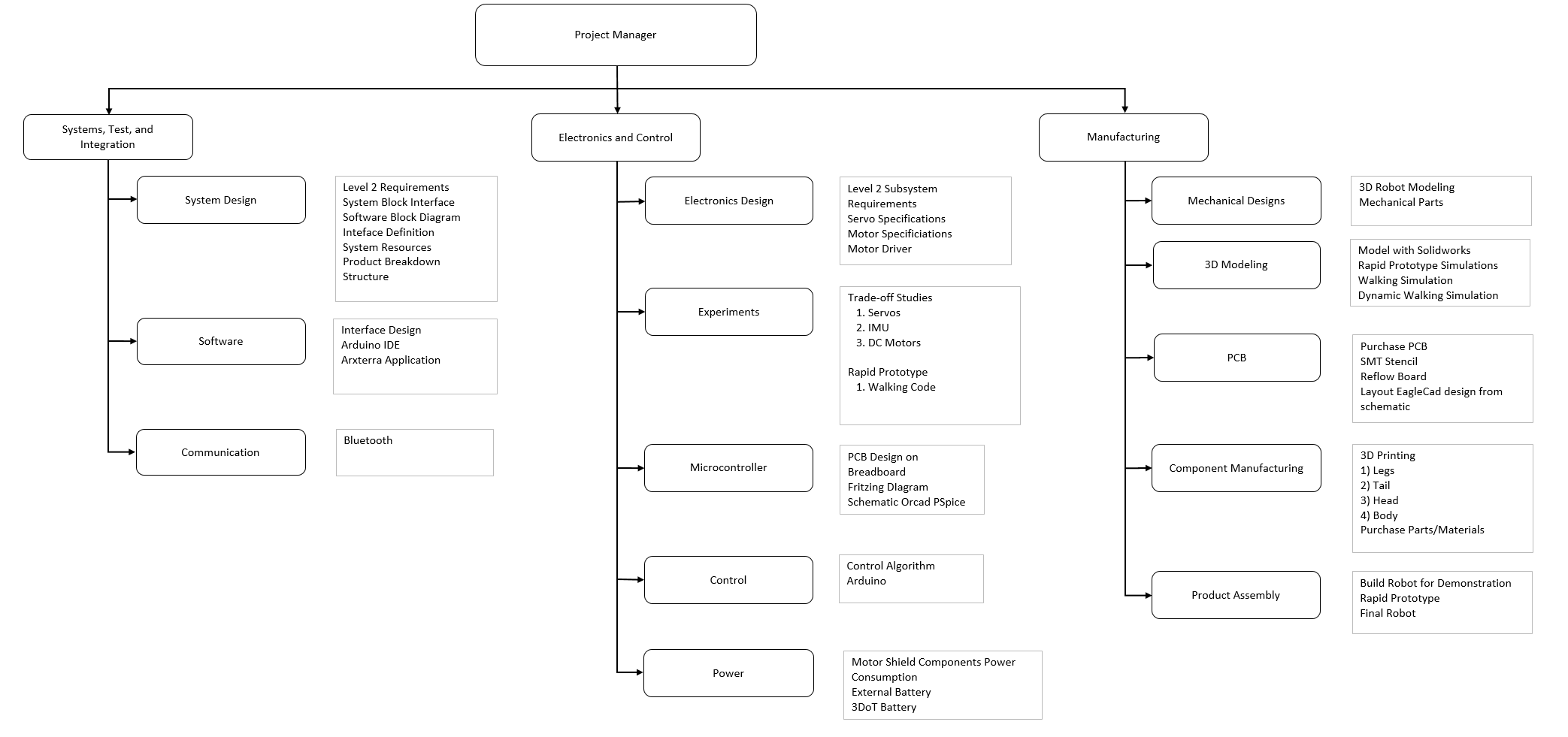
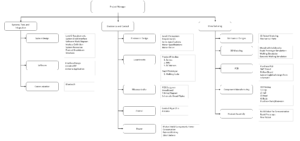
The Work Breakdown Structure in Figure 1 organize specific tasks to three section for the Velociraptor project. These three sections are assigned to division members in Mission, System, and Test, Electronics and Control, and Manufacturer. The overall diagrgam is overseen by the Velociraptor’s Project Manager to delegate these task to each division member. Each branch lists the responsiblity of the division member to meet the overall objective in completing the project.
work-breakdown-structure

Figure 1

Project Schedule

By: Lam Nguyen (Project Manager)

In order to meet deadlines for the Velociraptor Project, a project schedule was made to keep track of completed tasks. This schedule will not only benefit both the project manager and the division members but will also help move the project forward to build the robot.

Top Level Schedule

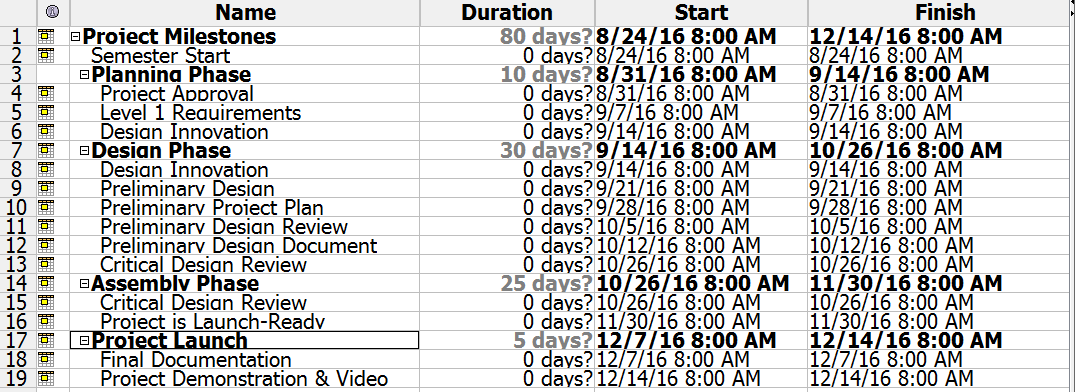
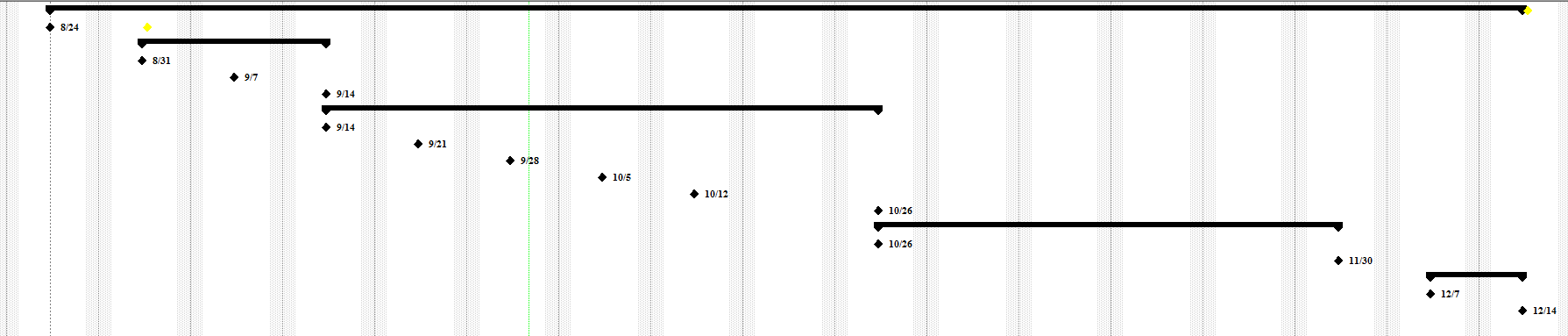
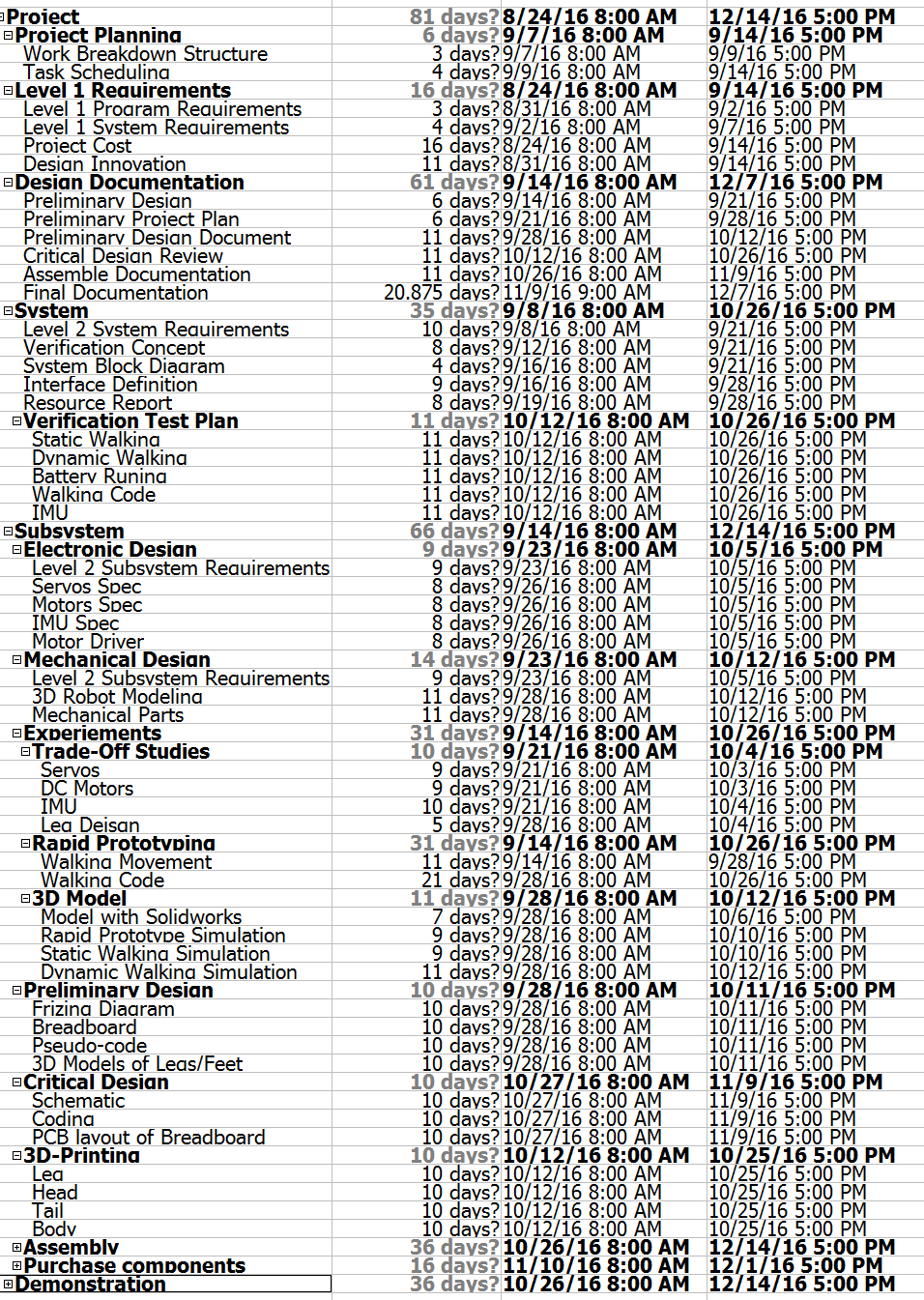
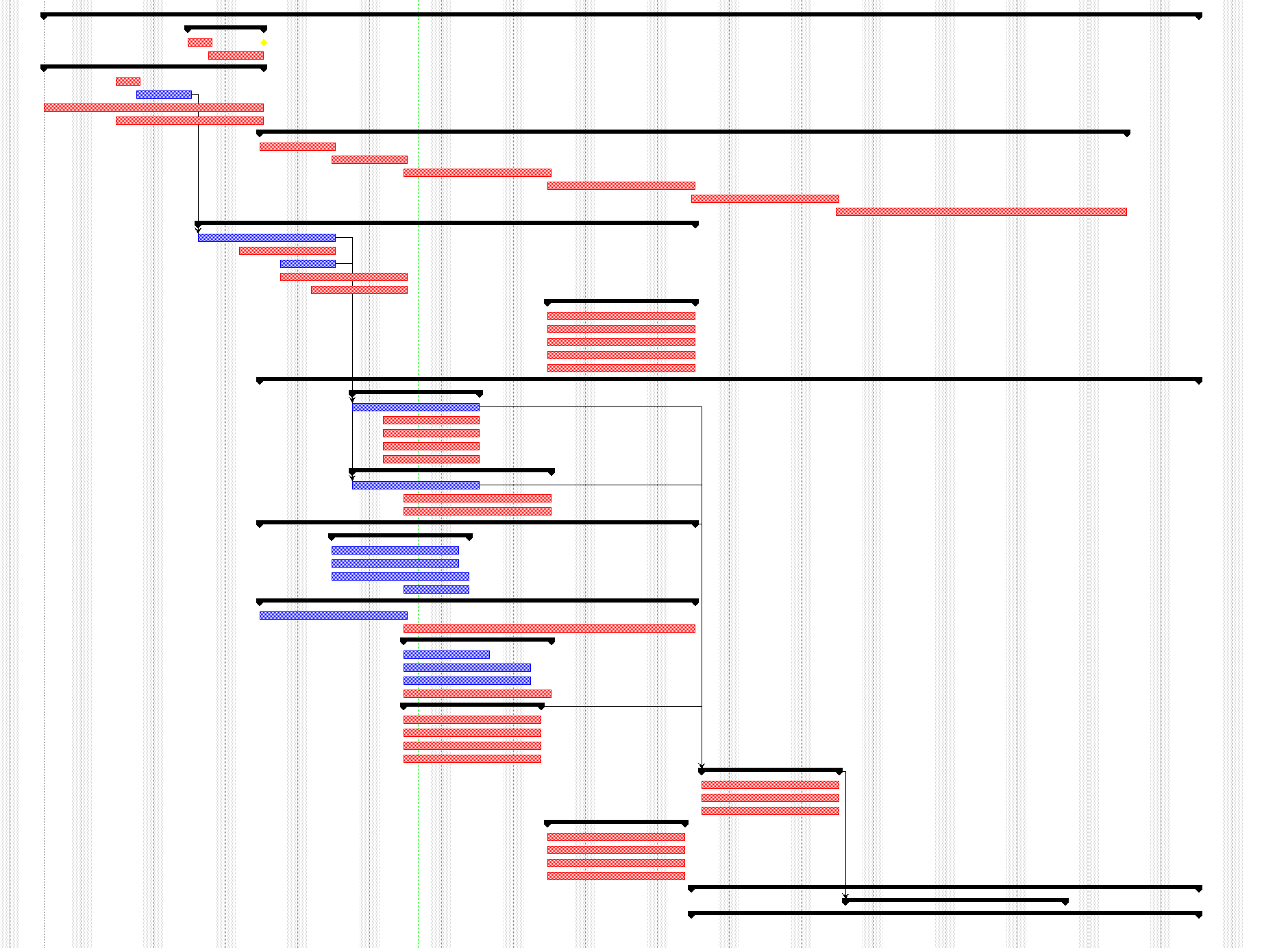
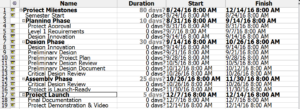
Top Level Schedule was created to keep track of tasks the project manager assigns each team member in Figure 2. Each task has a projected deadline assigned to each division member. Each deadline that is completed will help guide the team to focus on tasks unattended. The overview timeline of project in Figure 3 shows
 top-level-schedule

Figure 2

Top Level Overview

Figure 3

System/Subsystem Level Tasks

The System/Subsystem Level Tasks outlines the tasks for each division member and provides a projected time for each division members.
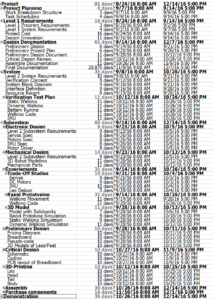
System and Subsystem level

Figure 3

system-and-subsystem-level-overview

Figure 4

Burn Down and Project Percent Completion

(TBA)

System Resource Reports

By: Hal Vongsahom (System Engineer)

Power Report

power

Figure 5

The power report is an overview of the initial power draw of the system. However, an important note is that the manufacture website or data sheet only listed power draw in current for all the components. Therefore, the power draw was calculated using Ohm’s law. The power report has a minimum and maximum power draw. A minimum power draw is when the velociraptor is not walking. A maximum power draw is when the velociraptor is walking. The measured power column is left blank at this moment. The group have not obtained any of the hardware to physical measure the current draw. However, the expected margin can give a rough estimate of the actually current.

The servos power draw was collected from the manufacture web site [1]. A total of three servos will be used. One servo to control the head, the second to control the tail, and the third is to control the threaded rod that will shift the center of mass accordingly. The total power draw for the three servos use the most power of the entire system.

The two DC motor comes second in drawing the most power for the system. The data was collected from the hardware website [2]. One DC motor will use for the right leg, and the other DC motor for the left leg.

The I2C and the MPU-6050 data was collected from the manufacture data sheet [3, 4]. The power draw for the I2C and MPU-6050 are not significant.

The 3Dot board data was collected from last semester Spider bot [5]. The Spider bot also use a 3Dot board last semester and measured actually values to verify that the ranges are correct. As a result, the velociraptor may use Spider bot data to factor into our initial power estimate.

Overall, the power is sufficient to operate the system. In addition, a 3,387 mW contingency is available for the system for other uncertainty.

Mass Report
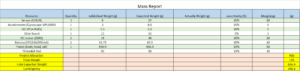
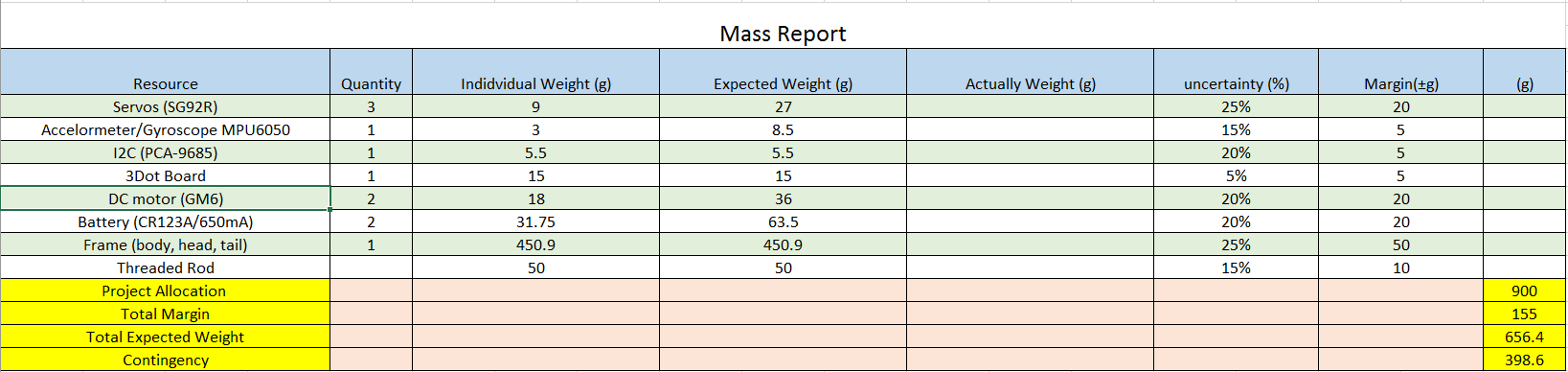
mass

Figure 6

The goal of this semester velociraptor is to weigh less than 900 grams. The mass of the MPU-6050 was gathered from the manufactured data sheet [3]. The mass of the MPU-6050 is very small and does not factor heavily in the project. The mass of the I2C is collected from the website [4]. The mass of the I2C also plays a small part. The mass of the 3Dot board was collected from the Spider bot last semester. Again, they were able to accurately measure the mass of the 3Dot board which justify it in this report.

The mass of the servo is collected from the manufactured website [1]. Since the quantity is in three, and it is acting as the velociraptor muscle. This add a decent amount of weight to the project. The DC motor mass was also collected from the website [2]. The quantity of the DC motor is two and adds 36 grams to the project. The battery mass of the battery is found online data sheet [6]. There will be two battery use in this project which ass 63.5 grams which is the second highest mass in the project.

The largest mass comes from the frame of the velociraptor. The frame of the mass was calculated using the total mass of the previous semester project minus the components mass of this semester [7]. The justification for using last semester mass is because their project was successful, therefore, this semester can factor that into this mass report for a good estimation.

Project Cost Estimate

By: Hal Vongsahom (System Engineer)
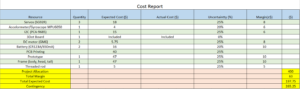
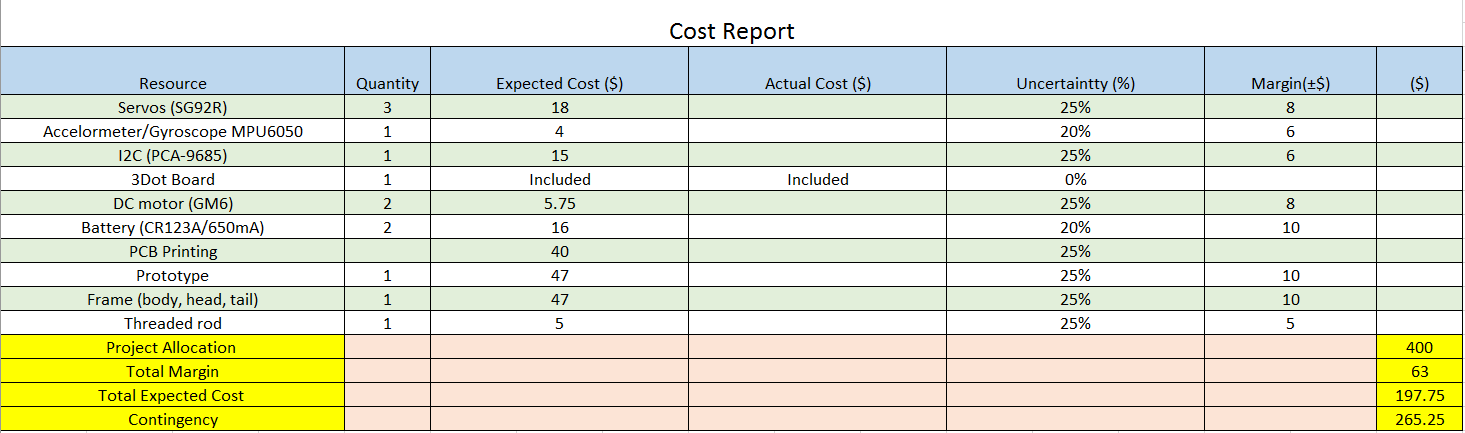
cost

Figure 7

The total project budget for this velociraptor project is 400 dollars. The PCB, Frame, and prototype cost for this semester velociraptor cost report was borrowed from last semester velociraptor [7]. Last semester project actually spent the funds approved by the customer. Therefore, a good estimation can be calculated in this cost report. Also to note, these parts are the most expensive resources of the project.

The MPU-6050, I2C, Battery, servo, threaded rod, and DC motor cost was collected from the retailer’s website [3,4,6,2,3,1]. The DC motor and servo are the second most expensive component for this project. The data for the system resource reports link mass and cost together. The more mass the component has, the more cost that component shall have as well.

Last note, the 3Dot board is provided by the customer, therefore, it is not factor in the cost.

Overall the initial cost is well within the project budget with enough budget to cover addition cost for uncertainty.

Resources

[1] Addicore SG90 9g Mini Servo. (n.d.). Retrieved September 28, 2016, from http://www.addicore.com/Addicore-SG90-Mini-Servo-p/113.htm

[2] https://www.pololu.com/product/182/specs

[3] https://www.cdiweb.com/datasheets/invensense/PS-MPU-6000A.pdf

[4] https://cdn-shop.adafruit.com/datasheets/PCA9685.pdf

[5] https://www.arxterra.com/spring-2016-3dot-spider-bot-preliminary-design-document/

[6] https://www.bhphotovideo.com/bnh/controller/home?O=&sku=1018868&gclid=Cj0KEQjw1K2_BRC0s6jtgJzB-aMBEiQA-WzDMZ4G93fpLNmiUX-CGjONHm0czidWkbbSiUMk3B_luoAaAqM68P8HAQ&Q=&ap=y&m=Y&c3api=1876%2C92051678402%2C&is=REG&A=details

[7] https://www.arxterra.com/spring-2016-velociraptor-project-summary/#Size_Weight

[8] https://www.grainger.com/category/threaded-rods/bolts/fasteners/ecatalog/N-8k5

Fall 2016 Pathfinder (Solar Panels): Preliminary Project Plan

By:

Inna Echual (Project Manager)

Stephan Khamis (Mission, Systems, and Test)

Jose Rodriguez (Electronics and Control)

Ridwan Maassarani (Design and Manufacturing)

Table of Contents

Work Breakdown Structure (WBS)

By Inna Echual (Project Manager)

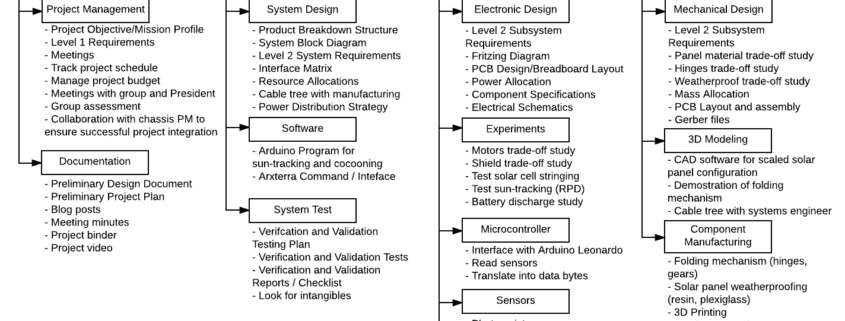
400d-work-breakdown-structure

Figure 1: Work Breakdown Structure

The Work Breakdown Structure shown in Figure 1 demonstrates the work needed to complete the solar panel component of the Pathfinder project. The work branches into the four divisions (including project management) and the work/unique tasks underneath associated with each division.

Project Schedule

By Inna Echual (Project Manager)

Top Level Schedule

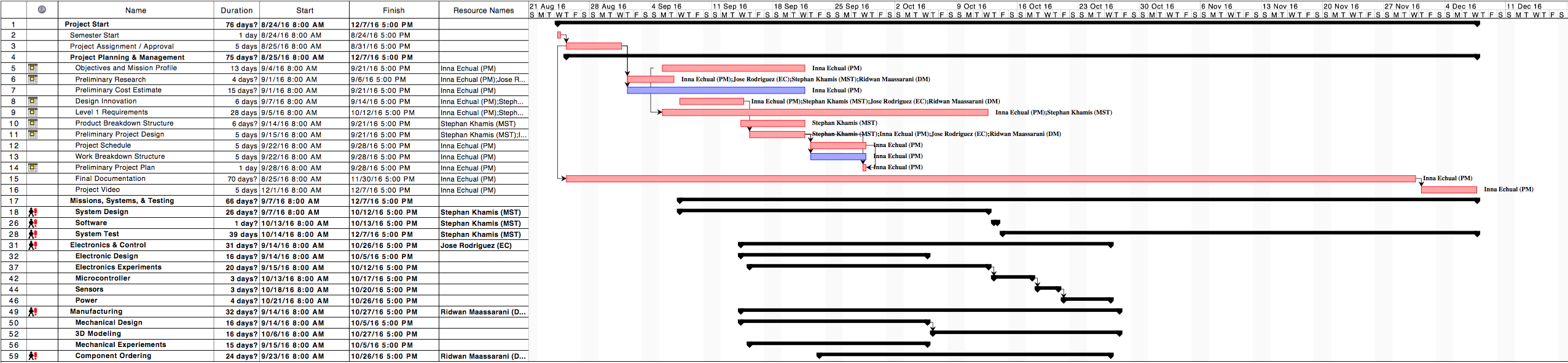
screen-shot-2016-09-28-at-12-38-27-pm

Figure 2: Top-Level Schedule

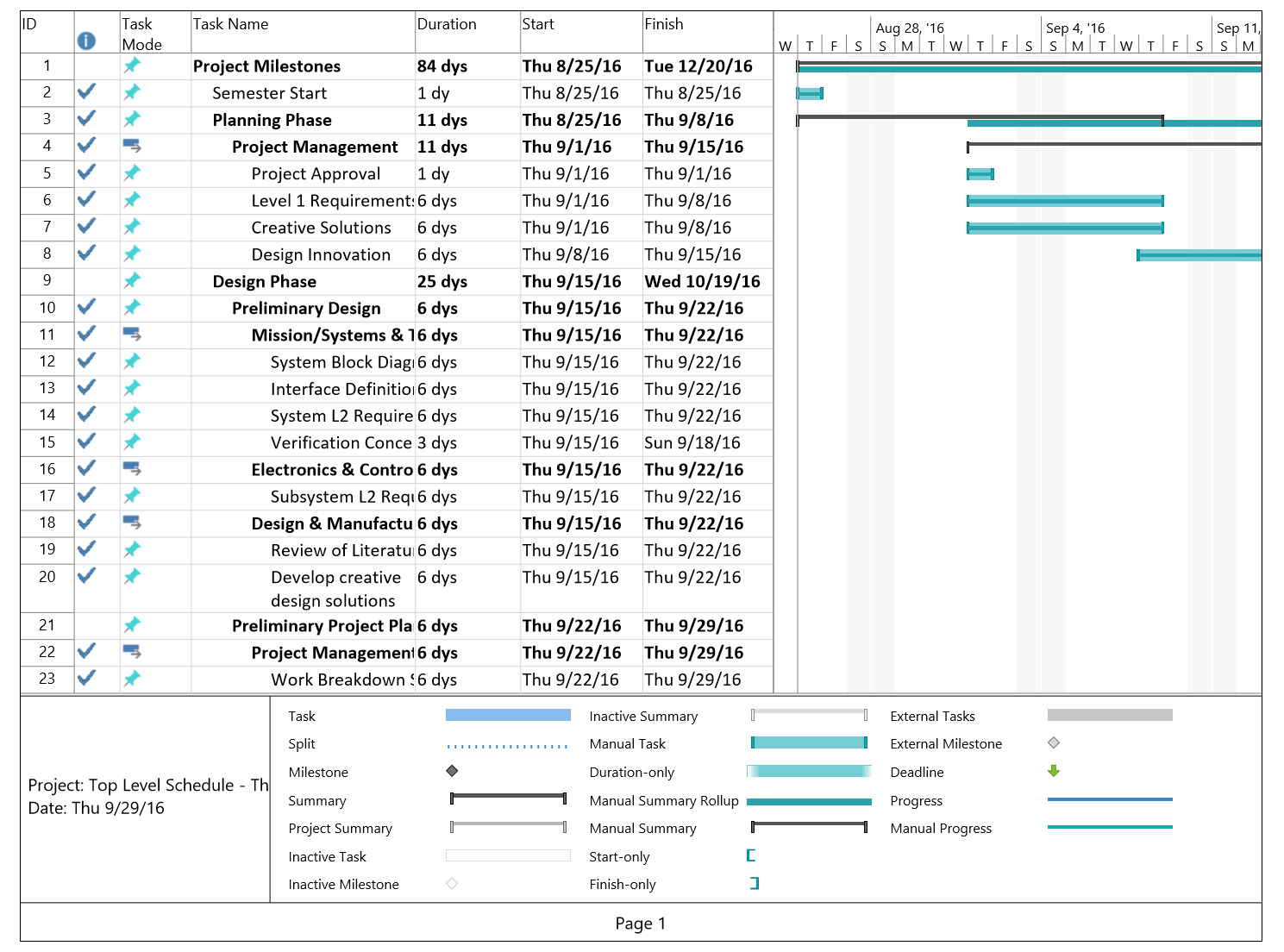
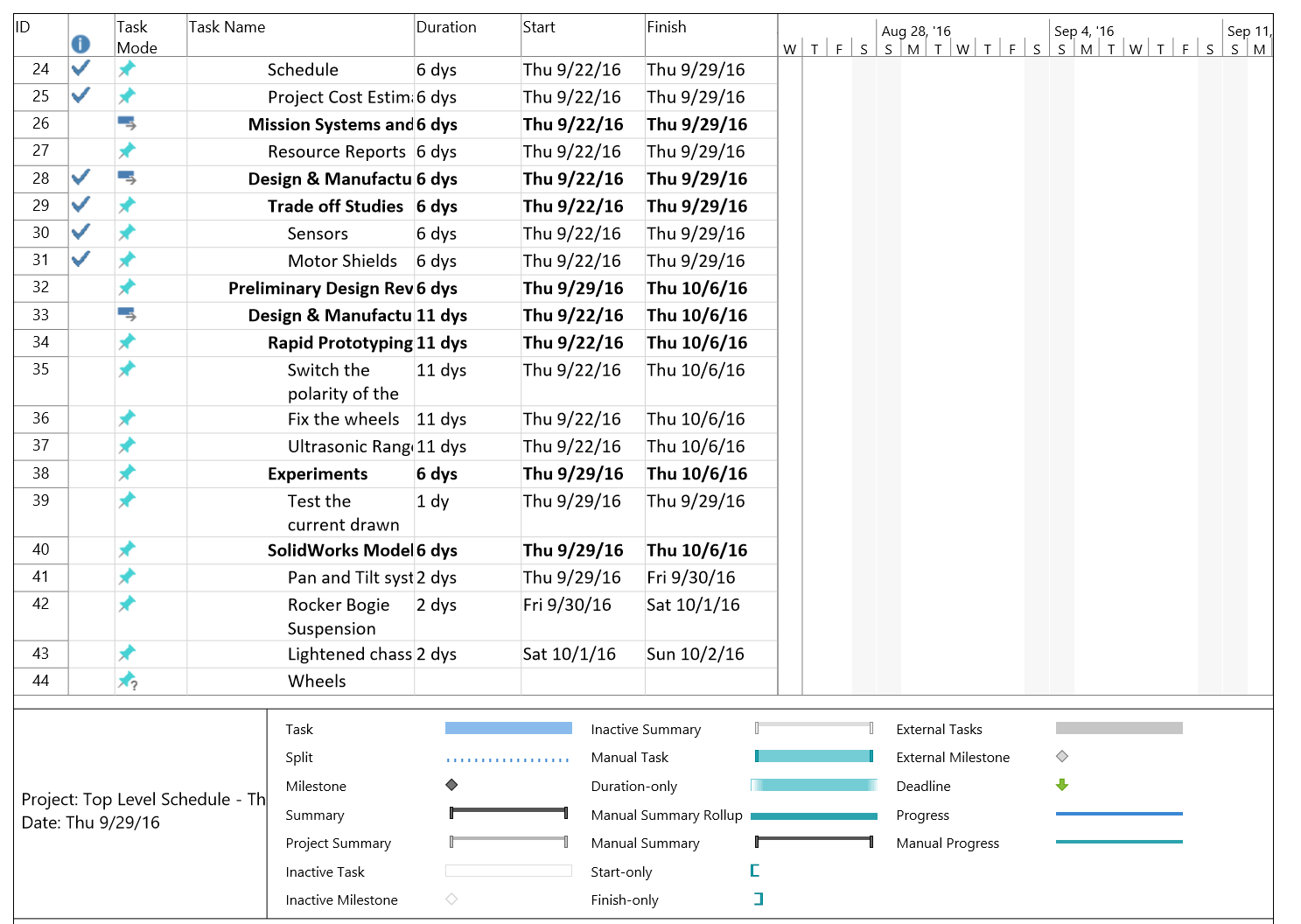
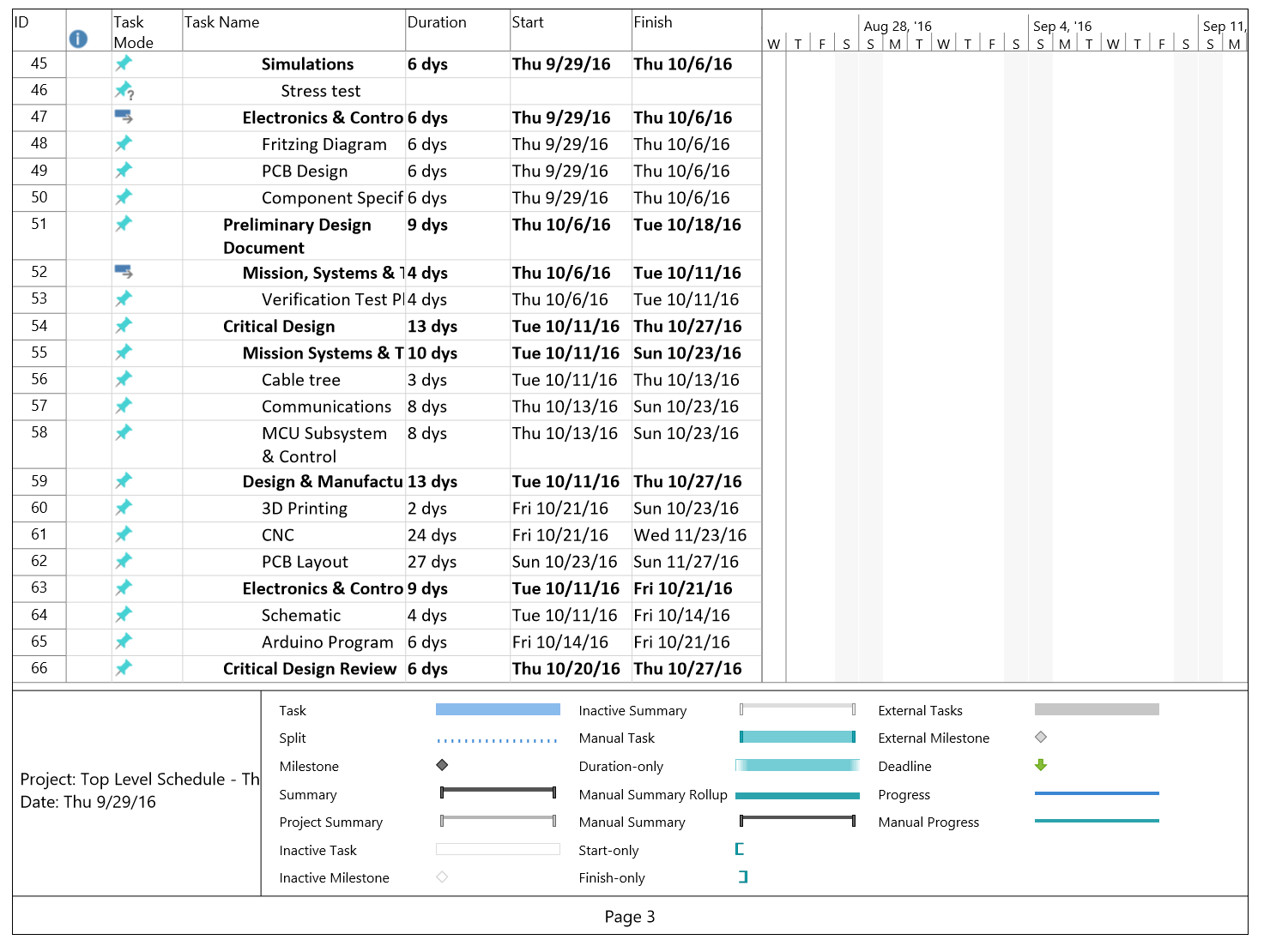
The top-level schedule shown in Figure 2 follows the blocks shown in the work breakdown structure. The major project deadlines are shown under the tasks of the project manager while each division’s individual tasks are nested under their respective division.

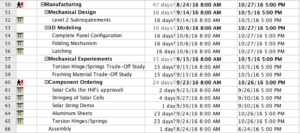
Currently, the tasks related to completing the folding mechanism (research, trade-off studies, 3D-Modeling, component specification and ordering, etc.) has the longest completion date and is our current critical path. We don’t have a solid choice for the folding mechanism yet so we still have to do further research and more studies to establish a design in order for our design to move forward.

System/Subsystem Level Tasks

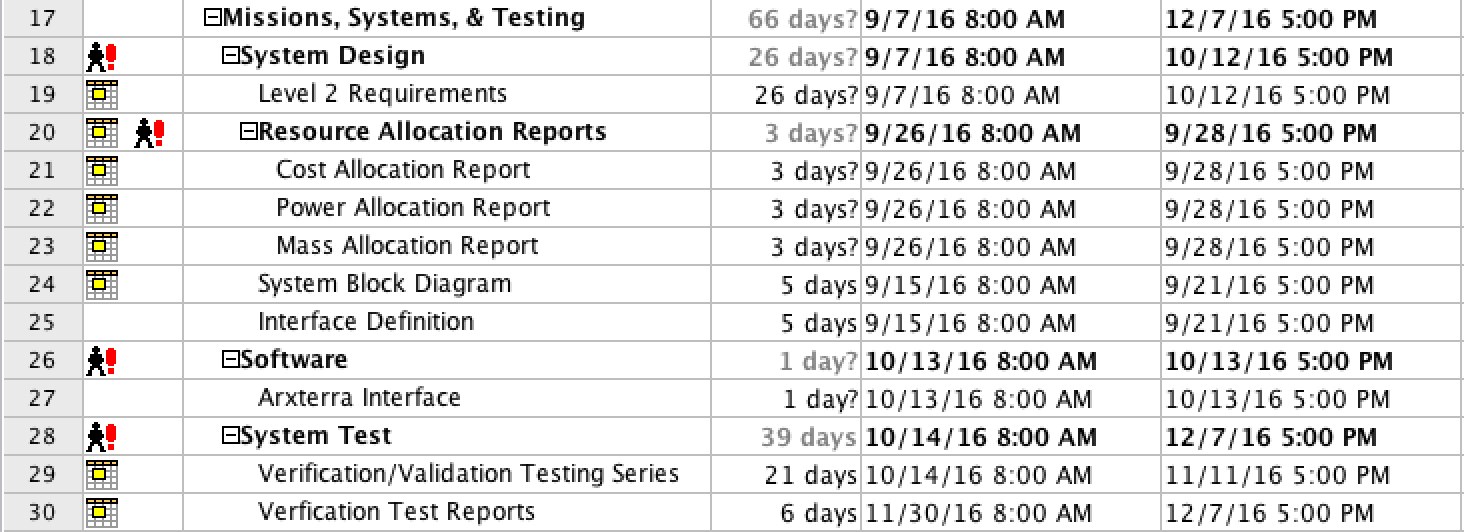
screen-shot-2016-09-28-at-12-59-54-pm

Figure 3: System Tasks

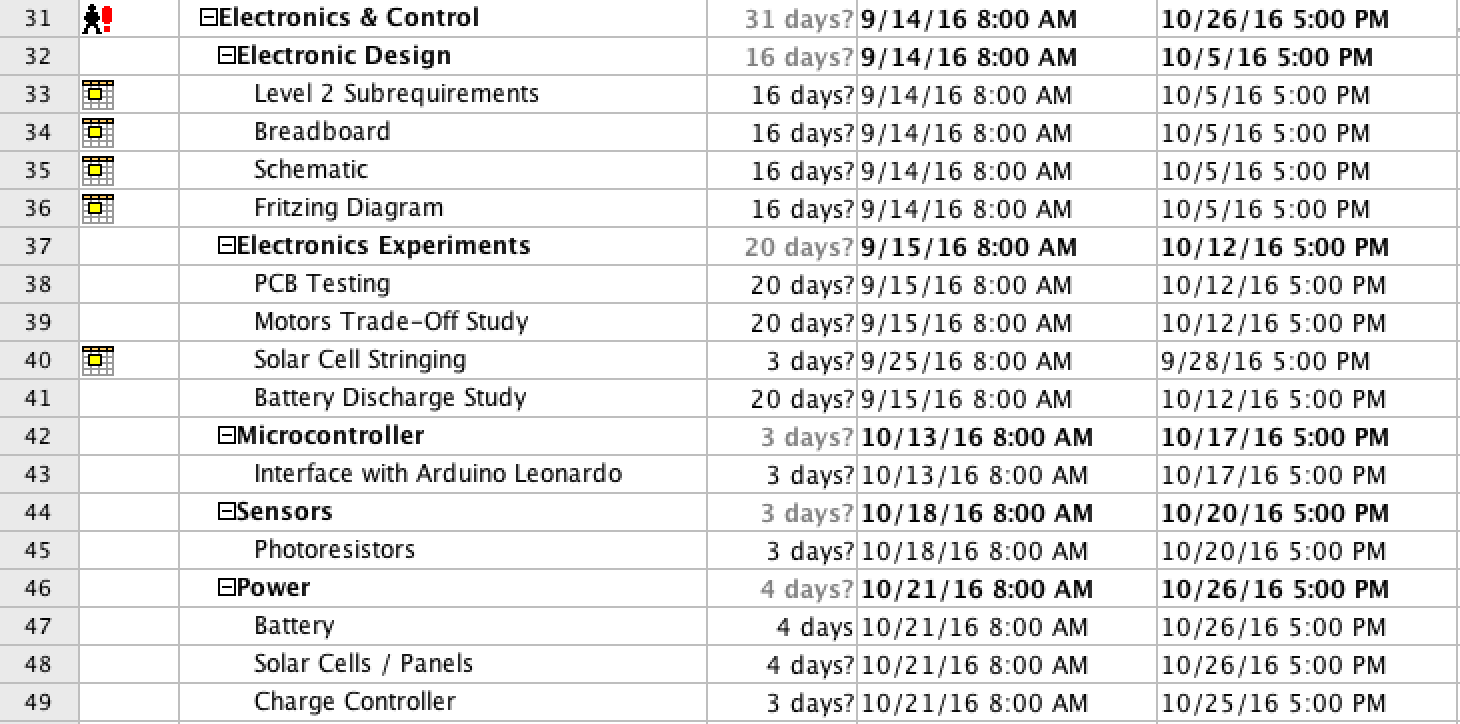
screen-shot-2016-09-28-at-1-00-11-pm

Figure 4: Subsystem (Electronics & Controls) Tasks

screen-shot-2016-09-28-at-1-00-30-pm

Figure 5: Subsystem (Manufacturing) Tasks

Burn Down and Project Percent Completion

burndown

Figure 6: Burndown Chart

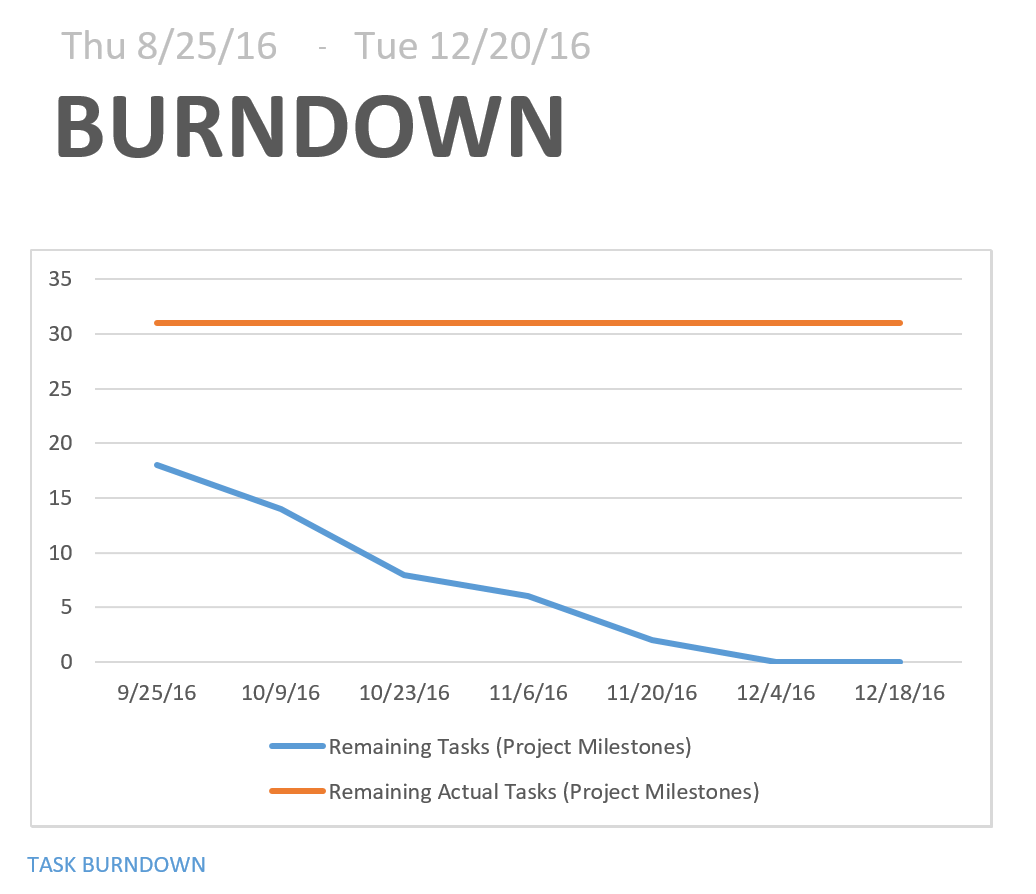
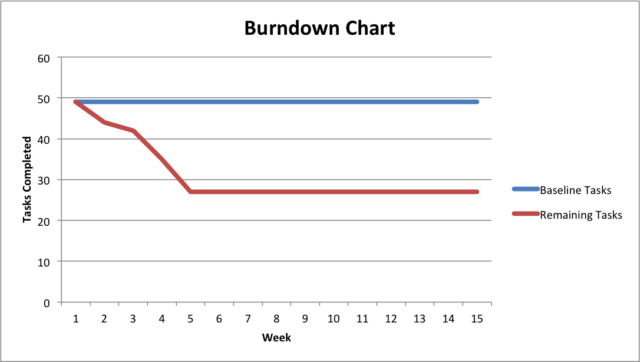
The project Burn Down Chart in Figure 6 demonstrates the work completed so far compared to the total amount of tasks expected to complete the project. The group has completed approximately 30 of the total tasks scheduled for the project. Currently, we are still trying to solidify a design for the folding mechanism so we may fall behind in the upcoming weeks due to research and trade-off studies.

System Resource Allocation Reports

By Stephan Khamis (Mission, Systems, and Testing)

Cost Allocation

screen-shot-2016-09-28-at-3-25-00-pm

Figure 7: Cost Allocation

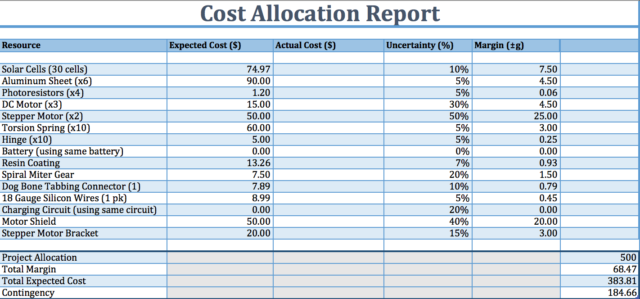
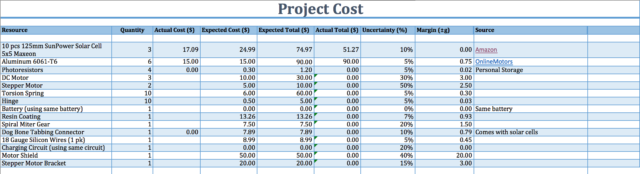
Our budget that we have set for ourselves is to keep the project under 500 dollars. All of the expected prices listed in Figure 7 are rough approximations or the average price for that type of component as, for instance, we have yet to define the specifications of the stepper motor will be using so its cost is yet to be defined but we have an approximation of its price. We are reusing some of the parts that were on the previous pathfinder, such as the battery and the charging circuit for the battery. Our total expected cost is $383.81 and we have a contingency of $184.66 dollars. We have allowed ourselves a margin of about $70.

Power Allocation

screen-shot-2016-09-28-at-5-32-51-pm

Figure 8: Power Allocation

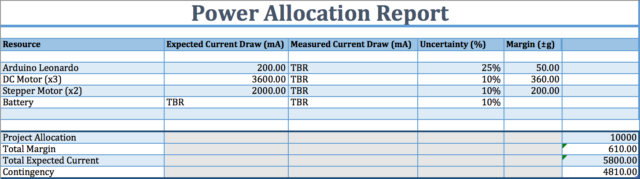
The expected power allocations are based on the components we expect to be using. We have  not specified our motors yet but we have a range of the current draw based on the models we are leaning towards. Battery specifications were to be provided by the chassis group but they have yet to provide us with their experimental data.

Mass Allocation

screen-shot-2016-09-28-at-3-26-14-pm

Figure 9: Mass Allocation

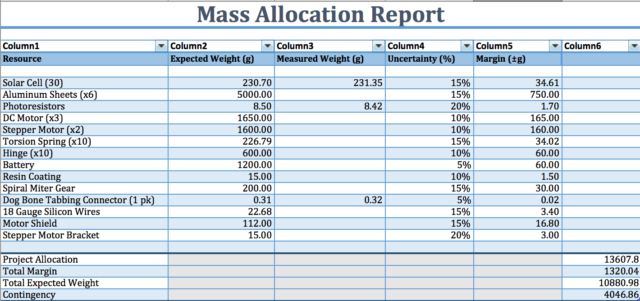
The mass report in Figure 9 are rough approximations of the mass of each component we expect to be using. We have yet to define specifically the DC motors and stepper motors we will be using so their mass is yet to be determined but we have a general idea. The aluminum sheets will have a honeycomb cutout structure to reduce its mass.

Project Cost Estimate

By Inna Echual (Project Manager)

screen-shot-2016-09-28-at-4-06-32-pm

Figure 10: Project Cost Estimate

From the Cost Allocation Report in Figure 7,  the overall projected costs are currently estimated to be $383.81. This price will be subjected to change as the project continues and is by no means a representation of a final product. However, we have already selected the type of solar cells we will be using—which are monocrystalline solar cells that already come with the tabbing connectors, ultimately reducing the cost of the overall project. However, the motors and springs have yet to be defined, which I expect will affect our total cost significantly.