


By: Raymundo Lopez-Santiago (Mission, System, and Test)
Verified by: Eduardo De La Cruz (Project Manager and Manufacturing Engineer)
Approved by: Miguel Garcia (Quality Assurance)
The purpose of this post is to determine what material and method of fabrication we will end up going with for the fabrication of our prototype and our final model.
Level 1 Requirements
Level 2 Requirements
This task has been well defined in the past by multiple groups, for the most part, the same type of fabrication methods tend to be picked, as well as the same type of materials for production of small robot toys. The pattern is:
For complex parts: 3D printing
Reasons:
Materials most often used:
For final prints:
For flat parts: Laser Cutting
Reason:
Materials most often used:
If interested in reading trade studies on these materials, and other materials tested, reference the resource material provided below.
For the most part, we have already established in our mission requirement list that we will be using 3D printed parts to make our robot. We will most likely follow this requirement due to the fact that most of our 3D printed parts will be to complex for laser cutting. However, we will remain open to the possibility of laser cutting. If we do end up laser cutting parts for our project, we will use birch wood because of the cost and weight of the material, in comparison to other materials such as aluminum or acrylic.

Author: Diane Kim (Division Manager of E&C Hardware)
Verified By: Jordan Smallwood (Project Manager)
Approved By: Miguel Garcia (Quality Assurance)
Table of Contents
The second PCB is for the solar panels which consists of the connection for the stepper motor drivers (3), current sensors (6), and GPIO expander. We are using the stepper motor from Sparkfun therefore we decided to go with the stepper motor driver associated with it—the EasyDriver. Although we wanted to implement the circuit itself, the IC that is used for the EasyDriver was not available, therefore we are going with the shield. To decrease the pins from the EasyDriver to the ATmega2560, we are using the I2C bus for the EasyDriver and the current sensors.
The connection from the EasyDriver to the ATmeag2560 are the MS1, MS2, DIR, ENABLE, and STEP. The Eagle file for the EasyDriver schematic can be found on Sparkfun’s website. The 3 stepper motor drivers are placed side-by-side horizontally.
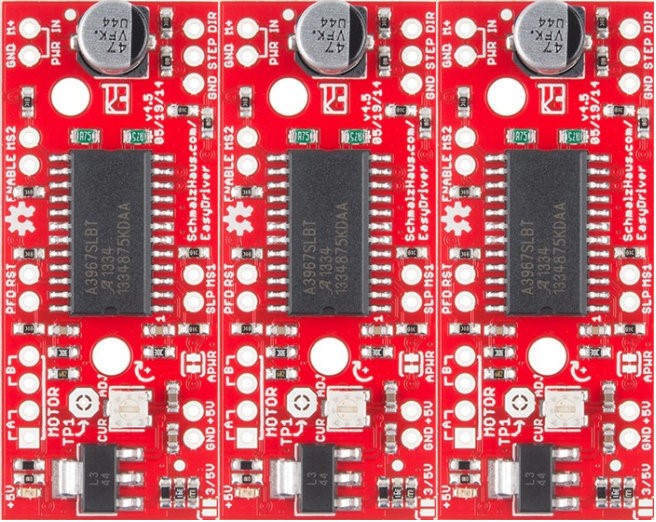
Figure 1: Placement of the Stepper Motor Driver
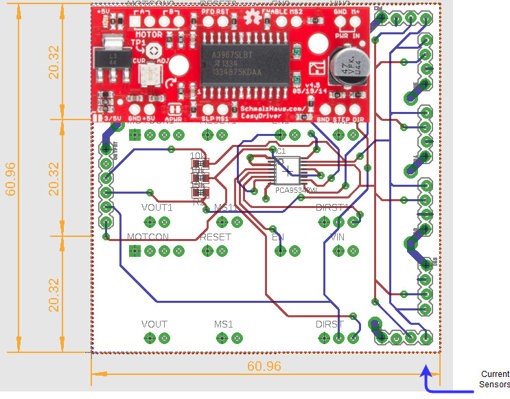
Figure 2: Placement of Motor Drivers on Solar PCB
MS stands for micro-step and is used to determine the resolution of the step. For our specific design, we will be setting both MS1 and MS2 to ground or both to low since we don’t need high resolution to fold and unfold the solar panels.

Figure 3: Truth Table of MS1 and MS2 Resolution
The DIR pin is a logic input that determines the direction of the stepper motor. The ENABLE pin is a logic input that determines whether the IC drives the motor. These two inputs will connect with the Atmega2560 by the I2C bus.
STEP is a logic input that is triggered when the pin goes from high to low. The STEP is connected between all three motor drivers since they will all be operating at the same time.
I2C connection uses the two connections SDA and SCL to connect between the master and the slaves. If we didn’t go with the I2C connection, we would have needed 7 wires from the stepper motor driver to the ATmeaga2560. By using the GPIO expander, we connect DIR and ENABLE for all 3 stepper motor driver to SCL and SDA. For our circuit, we are using the TCA9534APWR chip from Texas Instruments. Each I2C bus needs a pull-up resistor for both SDA and SCL. In addition to the SDA and SCL from the GPIO expander, we are adding the SDA and SCL from the current sensors to the I2C bus. We are using the 1NA3221 Breakout Board from Switch Doc which has four programmable addresses.
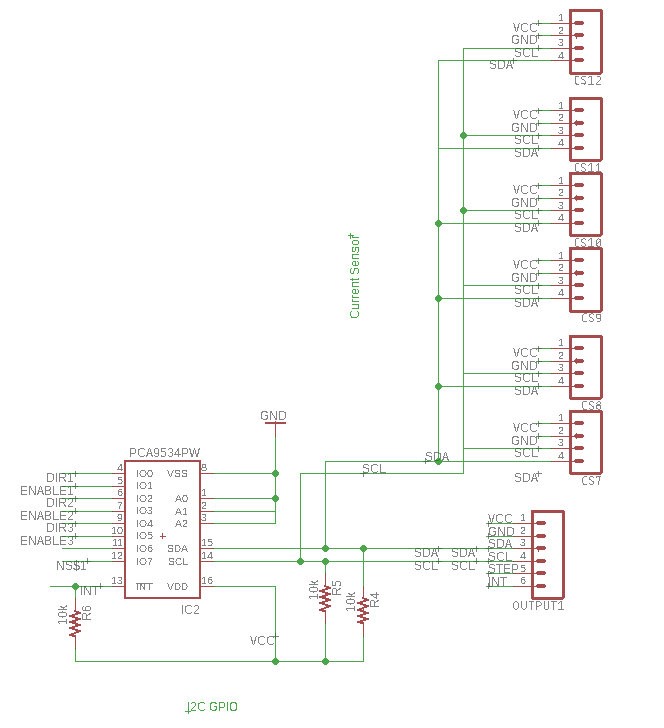
Figure 4: I2C Bus connection of Stepper Motor (DIR and ENABLE) and Current Sensors)
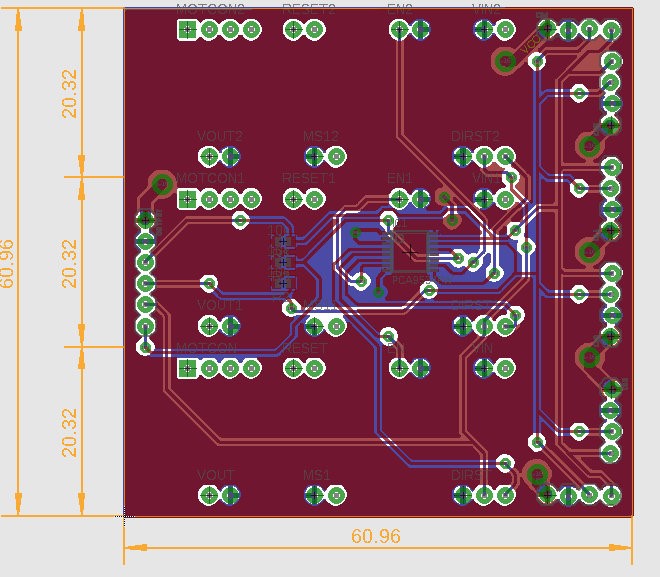
Figure 5: Final Version of PCB with Copper Ground and Power Planes
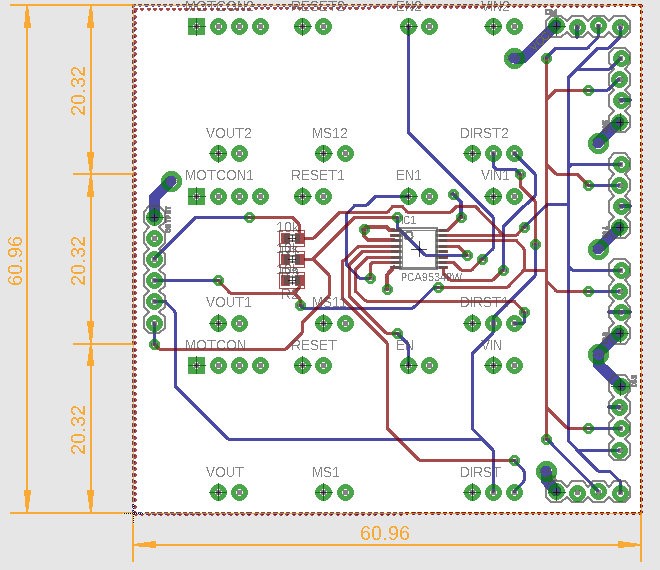
Figure 6: Final Version of PCB without Copper Ground and Power Planes
The Solar Panel PCB was never tested due to the solar panel mechanism never being completed.
Author: Diane Kim (Division Manager of E&C Hardware)
Verified By: Jordan Smallwood (Project Manager)
Approved By: Miguel Garcia (Quality Assurance)
Table of Contents
Unlike many of the other projects that are required to use the 3DoT board, we will be using the ATMega 2560 due to a large amount of connections. Since many of the interconnections are from pin to pin, specifically the motor drivers, we have made a custom shield to route many of these signals.
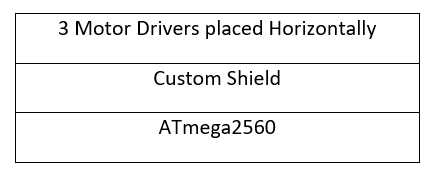
Table 1: Side view of the Design for the Custom Circuit
Aside from the connections to the peripheral devices that are mentioned above, the custom PCB for the chassis has the buck converter that will convert the 12v from the battery to 5v to supply power to the ATmega2560.
Through a different experiment, we confirmed that we will be using the LM2596 buck converter. Since we will be converting between a fixed voltage of 12v to 5v, we are using the fixed output design from the datasheet.
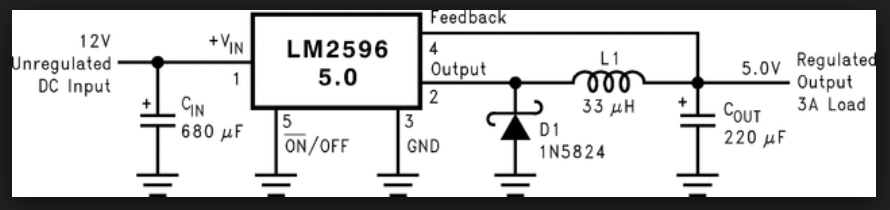
Figure 1: Typical Schematic of the Fixed Output Buck Converter
Based on the datasheet, the Cin , Cout, and inductor value was determined. The capacitors also have to be low-ESR or impedance for the circuit. The traces that are drawn with bolded lines must be kept short and thick for better results.
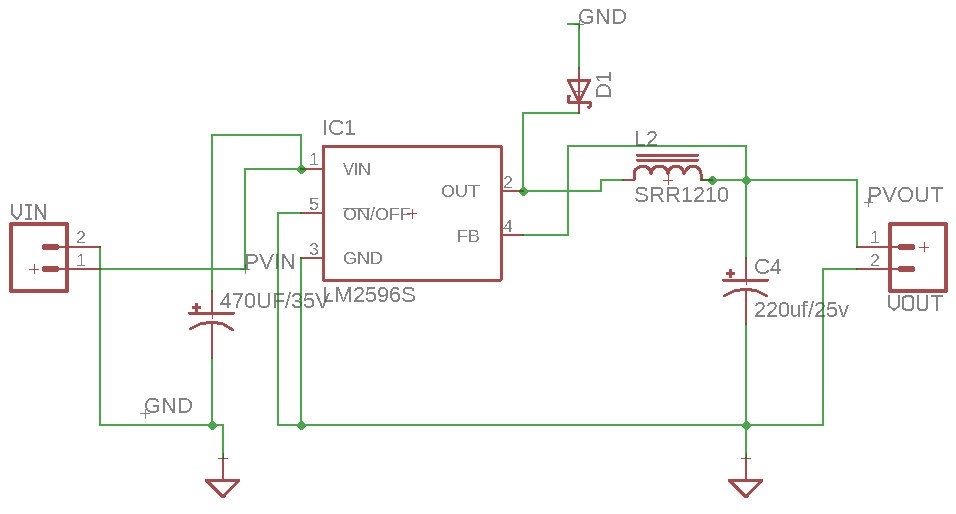
Figure 2: Eagle Schematic of the LM2596
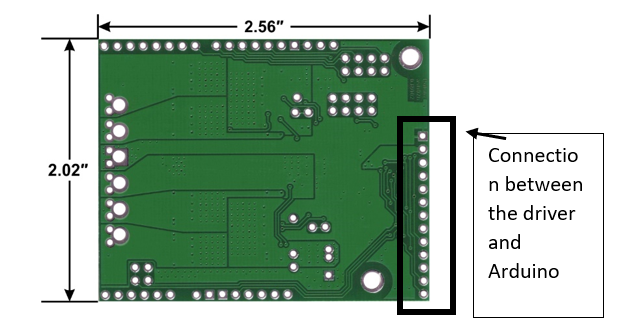
Figure 3: Dimension of Pololu dual VNH5019 motor drive
We are using the Pololu dual VNH5019 motor driver for the Pathfinder. Since we are limited to a 5×4 cm (WxL) board, due to limitation’s of the PCB fabrication machine we are using, we have decided to place the connectors so that the board doesn’t exceed the maximum size. The drivers are placed vertically so that the width of the PCB doesn’t exceed 5 cm.
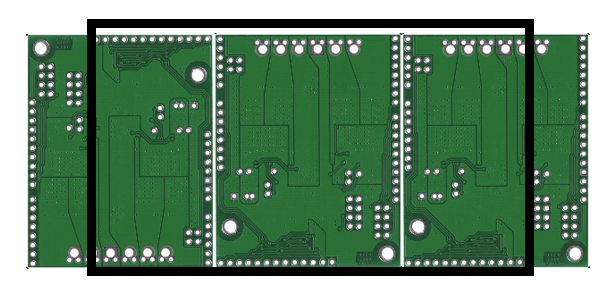
Figure 4: The Overview of how the motor drivers are placed The black outline is the line of dimension of the shield so that it doesn’t exceed 5 cm.
We initially thought about making the HM-10 Bluetooth module a part of our PCB circuit, but we instead decided to use the breakout board and use connectors. Since the RX of the Arduino can only take in 3.3v and the TX of the HM-10 outputs 5v a voltage divider was used. To get 3.3v from 5v, we used 1k and 2k resistors.
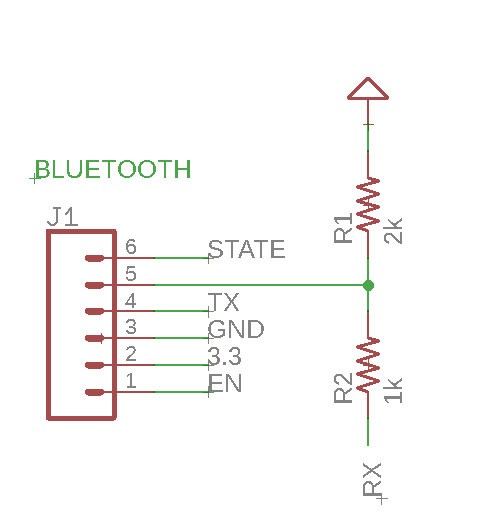
Figure 5: Level shift resistor for the HM-10 connection to RX of Arduino Mega
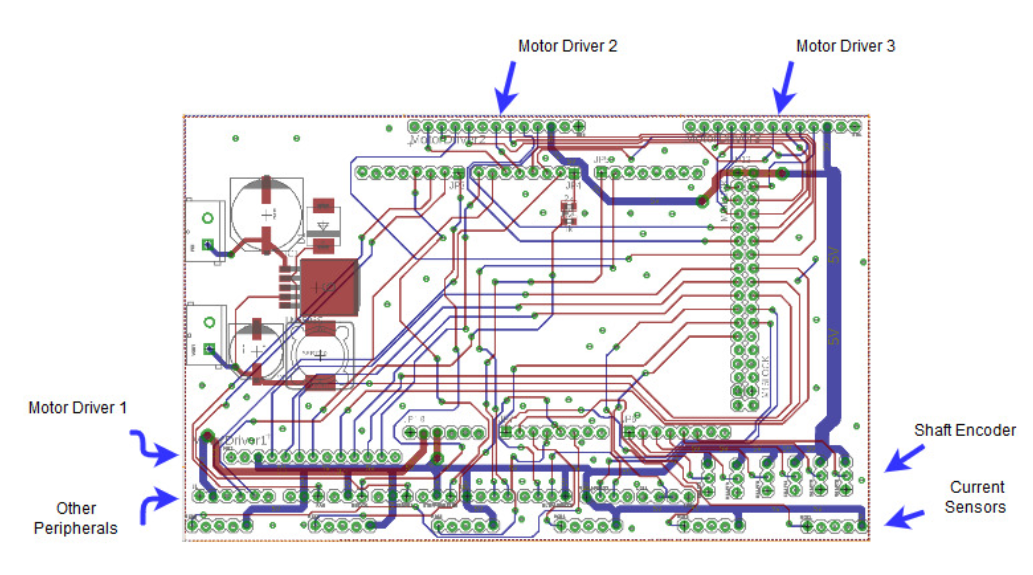
Figure 6: Eagle File for Final Chassis PCB with ground pour
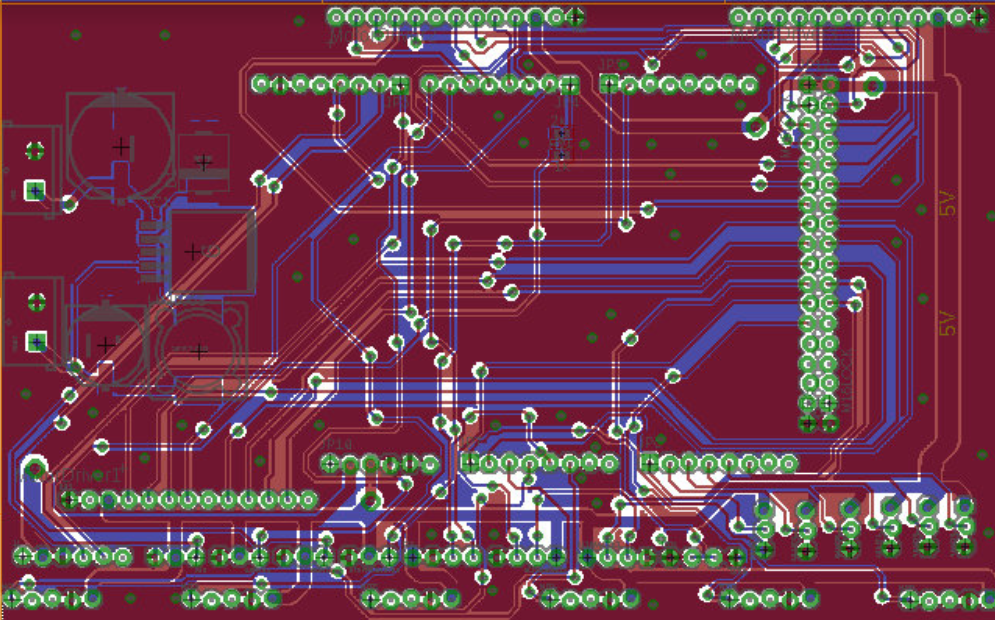
Figure 7: Final Chassis PCB without Ground Pour
The board was very simple to design since it essentially connected all the systems together, however, there were some considerations that needed to be accounted for. The size of the board was restricted to 4″ by 5″ due to the fabrication machine used. Since the motor drivers had to be placed horizontally and the board was a shield for the ATmega2560, the positions of the connectors were fixed and some of the traces had more resistance than the shorter wires. In addition, the ground and the power
planes needed to be laid out so that there is a good connection. This means that ground vias were added and the trace for the power was thicker than the traces for transmitting data. Another problem that arose was the connection between the pads and the connectors. The connectors did have a connection but it was easily disconnected if a small force was applied to it.
By: Diane Kim (Division Manager of E&C Hardware)
Verified By: Jordan Smallwood (Pathfinder Project Manager)
Approved by: Miguel Garcia (Quality Assurance)
Table of Contents
Fritzing is a program that allows easy PCB design. It allows the user to convert their design on breadboard to CAD files. On the breadboard view, there are parts that are commonly used such as Arduino boards, resistors, motor drivers, and Bluetooth modules. The breadboard view can also be converted into the schematic.
We spent one week on the training for the Fritzing program. We used the documentation from the EE400D website. One document focused more on the steps to use the program. It started from the working on the breadboard view. The documentation worked on creating a fritzing diagram for a motor driver and Bluetooth. Since I was new to the program as well as the division manager, I went over through the program first and created the diagram. I provided the documentation and walked through the process with the group. The assignment was graded as a homework.
The use of the Fritzing diagram for this class was mainly focused on presenting. It was used for showing what type of components and the connections between them and the microcontroller. The one thing that we could have worked on is making custom components within the Fritzing diagram, but we didn’t go over that because none of the teams needed to make custom components.

By: Diane Kim (Division Manager of E&C Hardware)
Verified By: Jordan Smallwood (Pathfinder Project Manager)
Approved By: Miguel Garcia (Quality Assurance)
Table of Contents
Eagle is a program used to design and layout custom boards. We went through a series of training for using Eagle CAD.
The first training was based off the documentation from Sparkfun. It was focused on designing the schematic. These were the points of the program that we went over:

Figure 1: Toolbar of the Eagle Schematic
The second training was focused on designing the board layout. These are the key points that were went over.

Figure 2: Toolbar for Eagle Board
This training was focused on applying what was learned. The first practice was done together where a simple low filter schematic was given to design on Eagle.
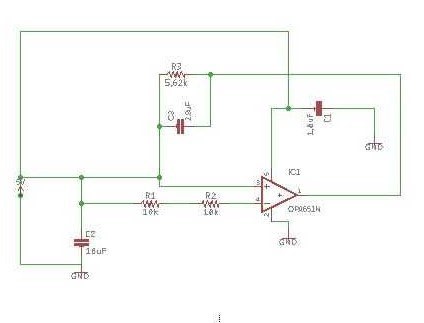
Figure 3: Low Pass Filter Schematic using Operational Amplifier
After the first practice, the second assignments were given as homework. The second assignment given was to design an I/O expander circuit.
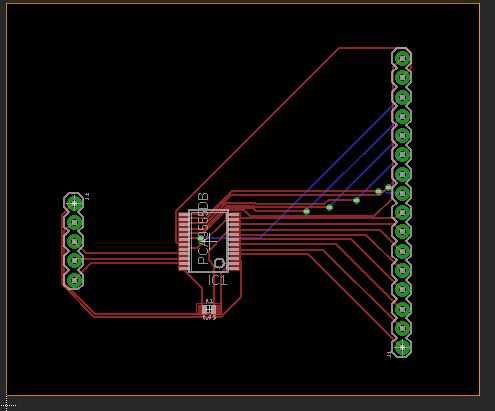
Figure 4: Board Design of I/O Expander HW assignment
For the last part of the application, I assigned two quizzes. Each quiz was 40 minutes long and were given a simple circuit to design on the schematic and board. There were certain restrictions such as the mil size, the placement of the connectors, the size of the board, and the components’ packages. The grading criteria is the following:
The first quiz was an IR sensor and the second is the boost converter. The schematics are shown below
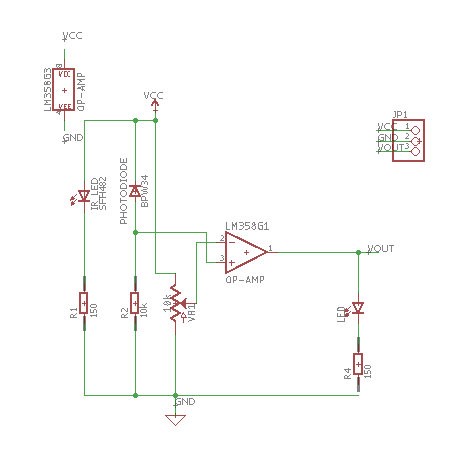
Figure 5: Quiz 1, IR sensor
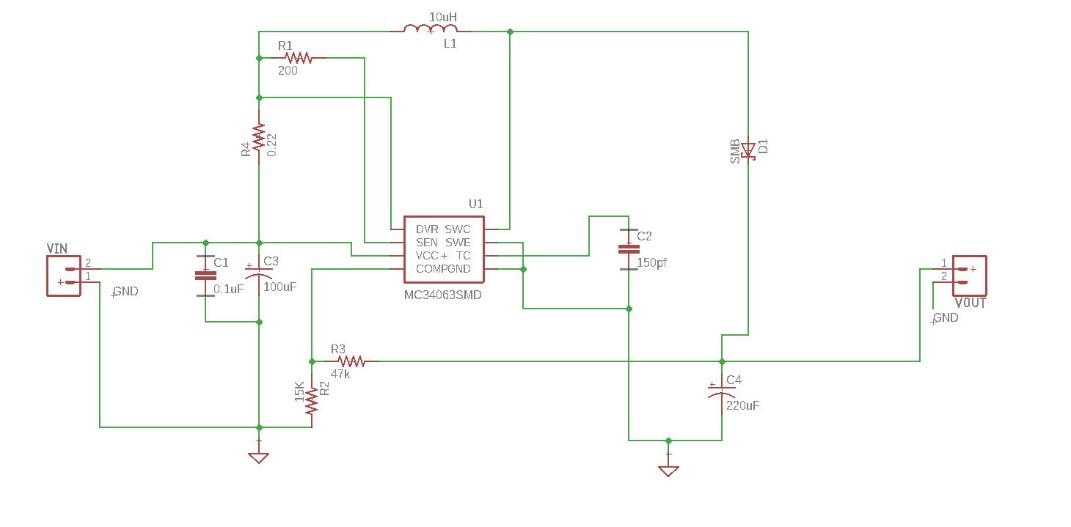
Figure 6: Quiz 2, Boost Converter
By: Raymundo Lopez-Santiago (Mission, System, and Test)
Verified by: Eduardo De La Cruz (Project Manager and Manufacturing Engineer)
Approved by: Miguel Garcia (Quality Assurance)
This blog post covers 3DoT Hexy’s power budget. 3DoT Hexy’s power budget was determined using the version 6.xx power budget template. The template has been filled out with max current drawn from each component obtained from datasheets. Values will be updated as soon as they are measured. There may be a possibility that we will not need a Texas Instruments boost converter to power our two micro metal motors at 5V. Further testing will be concluded before a decision is made. In the meanwhile, the boost converter was not included in this revision template.
The complete 3DoT Hexy power budget spreadsheet can be seen by clicking the following link: 3DoT Hexy Power Budget.
After improving 3DoT Hexy’s gear system, a 5V boost converter will not be required for the project since the robot can operate efficiently at 3.6V.
Components used in the 3DoT Hexy robot include:
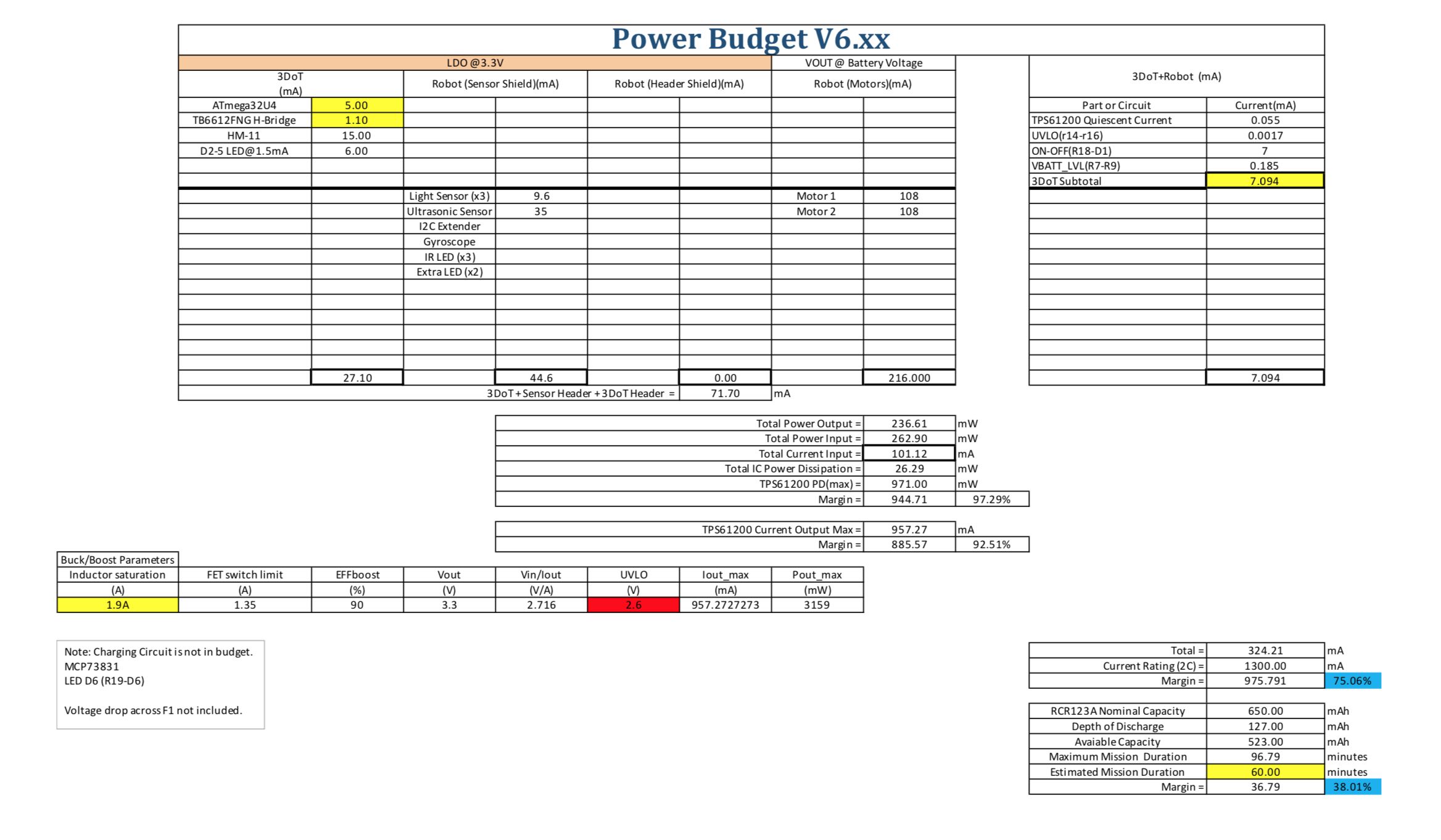 Fig. 1: 3DoT Hexy Project Power Budget
This blog post covers 3DoT Hexy’s power budget. See Fig. 1. One recommendation when using the template is to make sure values for current are in mA. Maximum mission duration is xx. Our estimated mission duration is xx minutes. There is enough margin to compensate for a few more minutes of operation.

By: Raymundo Lopez-Santiago (Mission, System, and Test)
Verified by: Eduardo De La Cruz (Project Manager and Manufacturing Engineer)
Approved by: Miguel Garcia (Quality Assurance)
This blog post covers the 3DoT project power budget. With the design of the version 6.43a of the 3DoT board, the existing power template from last semester needed to be updated. A major change from the last revision to this version is the parameters of the buck/boost converter. The previous revision had the output of the converter at 5V. This current revision has the converter output 3.3V to be used for peripherals needed for each robot project. This revision utilizes the same TPS61200 converter. The battery that will be used is the RCR123A 650mAh, 3.6V Li-Po. The project power budget template version 6.xx has been updated with the help of Professor Hill and Ryan Nguyen.
Components of the 3DoT can be found in the schematic for the version 6.43a of the 3DoT board. For the schematic, click the following link: 3DoT v 6.43a Schematic.
This version updates the categories defined in the previous version. These categories include the LDO at 3.3V and output from the battery. The LDO incorporates the internal circuitry of the 3DoT board, sensor shield, and header shield. Output from the battery at the rated 3.6V can be used for motors/servos.
The complete power budget spreadsheet can be seen by clicking the following link: 3DoT Project Power Budget Template.
The user can input valued for peripherals used in the correct section. Any sensors should be added to the sensor shield or header section. Motors should be added in the Vout section. See Fig. 2 for clarification. Values inserted for current draw should ones from measurement but values from datasheets will be a good start.
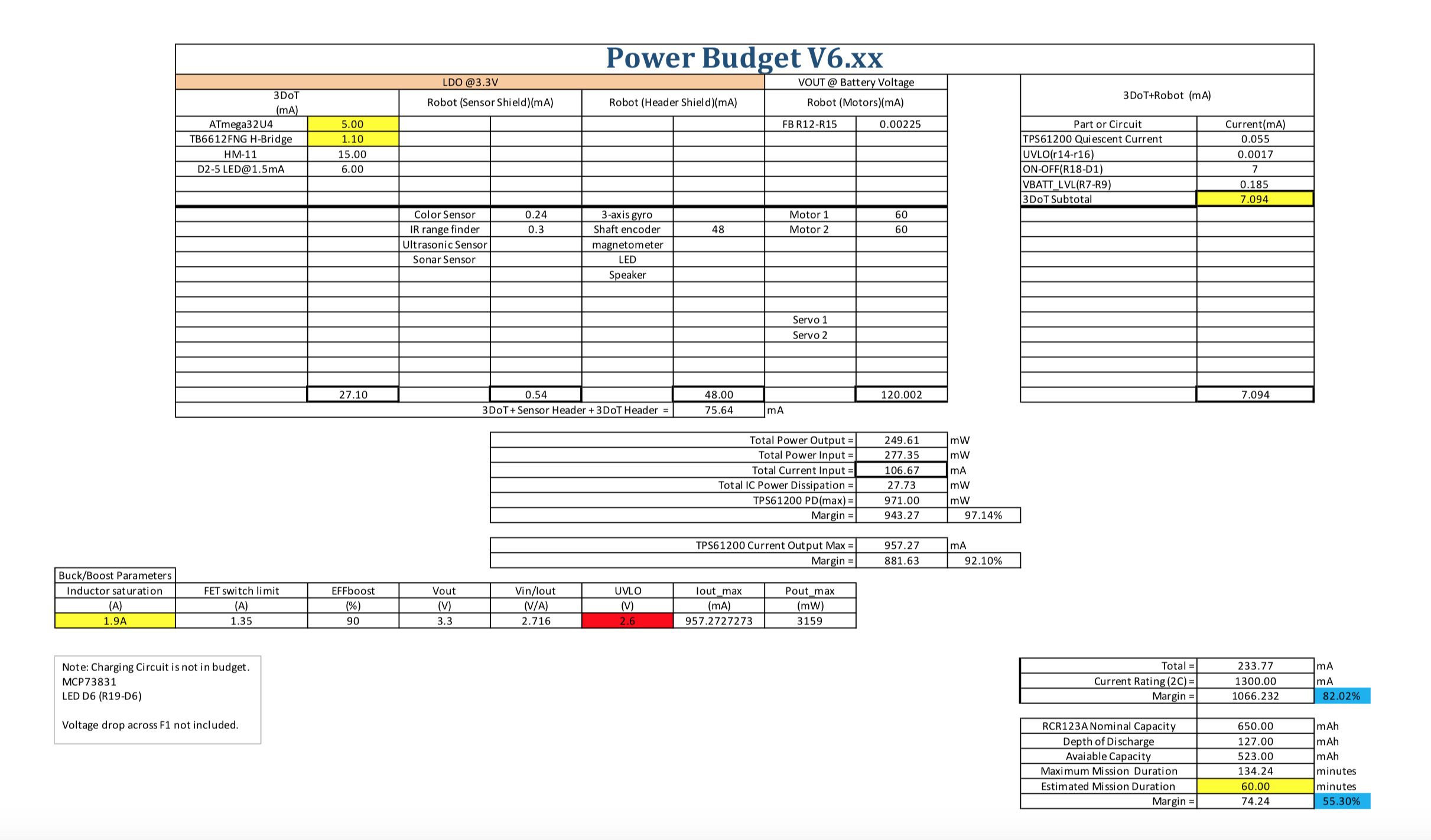 Fig. 1: Spring 2018 3DoT Project Power Budget
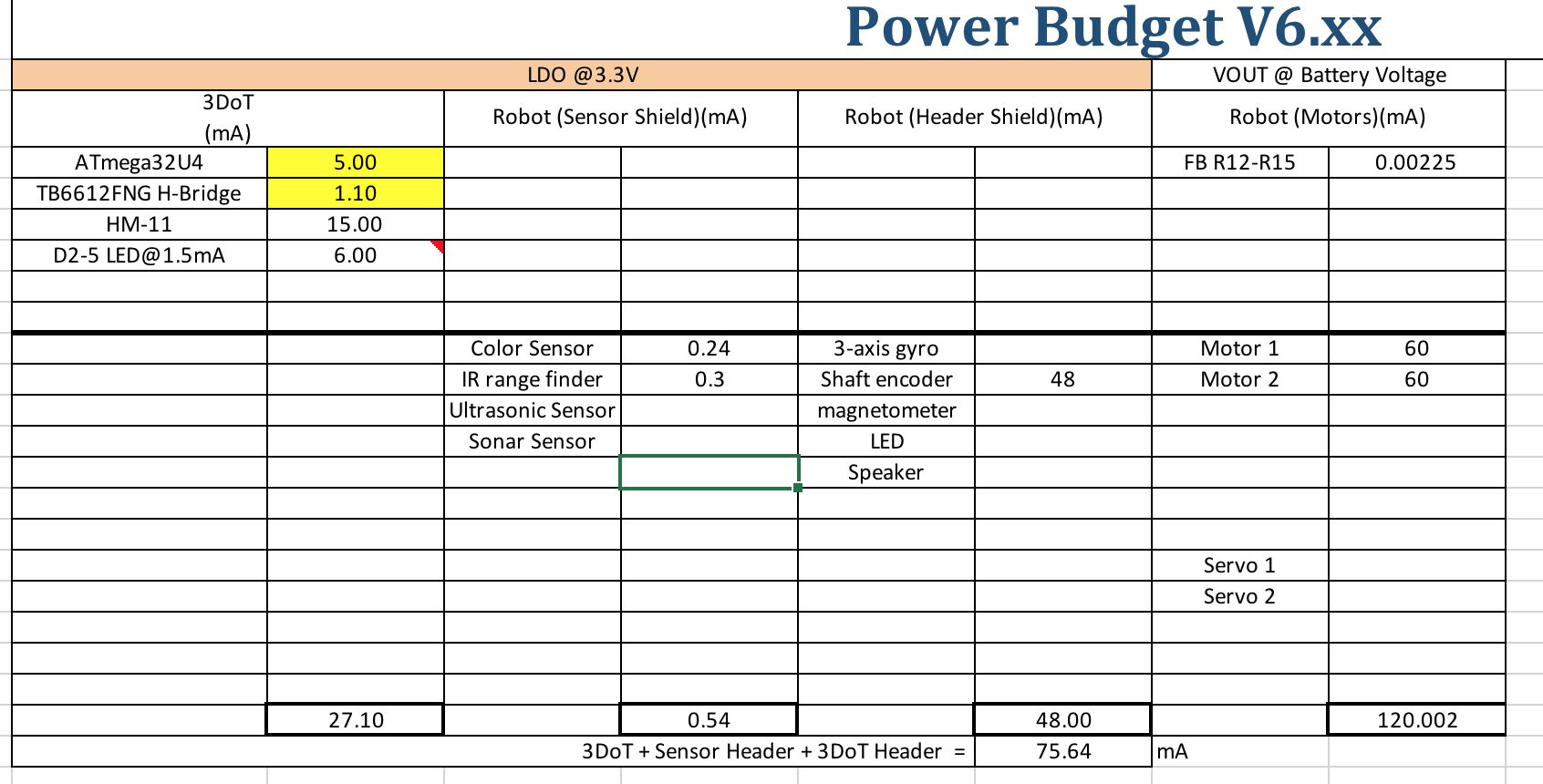
Fig. 2: LDO @3.3V and Vout @ Battery voltage section
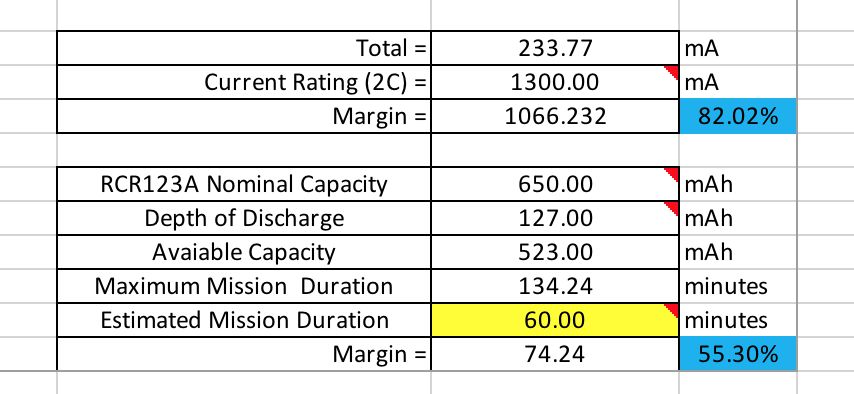 Fig. 3: Calculations for current draw and mission duration
The objective of this power template is to allow each project team to record all peripherals used in their project and their current draws. This template helps identify all current draws so the robot can operate efficiently without exceeding the battery values. Once all the values are inputted for each respective peripheral device used, calculations are automatically updated. The calculations are displayed towards the bottom of the document, see Fig. 3. All the information calculated includes total current draw and the maximum mission duration which is defined differently for each project.

By: Raymundo Lopez-Santiago (Mission, System, and Testing)
Verified by: Eduardo De La Cruz (Project Manager and Manufacturing Engineer)
Approved by: Miguel Garcia (Quality Assurance)
This blog post covers 3DoT Hexy’s Resource Report which include cost, power and mass.Values for the battery and 3DoT board were initially estimated based on the final blog post of 3DoT David. Values for each component or device are updated as the project is further developed.
Mass Report 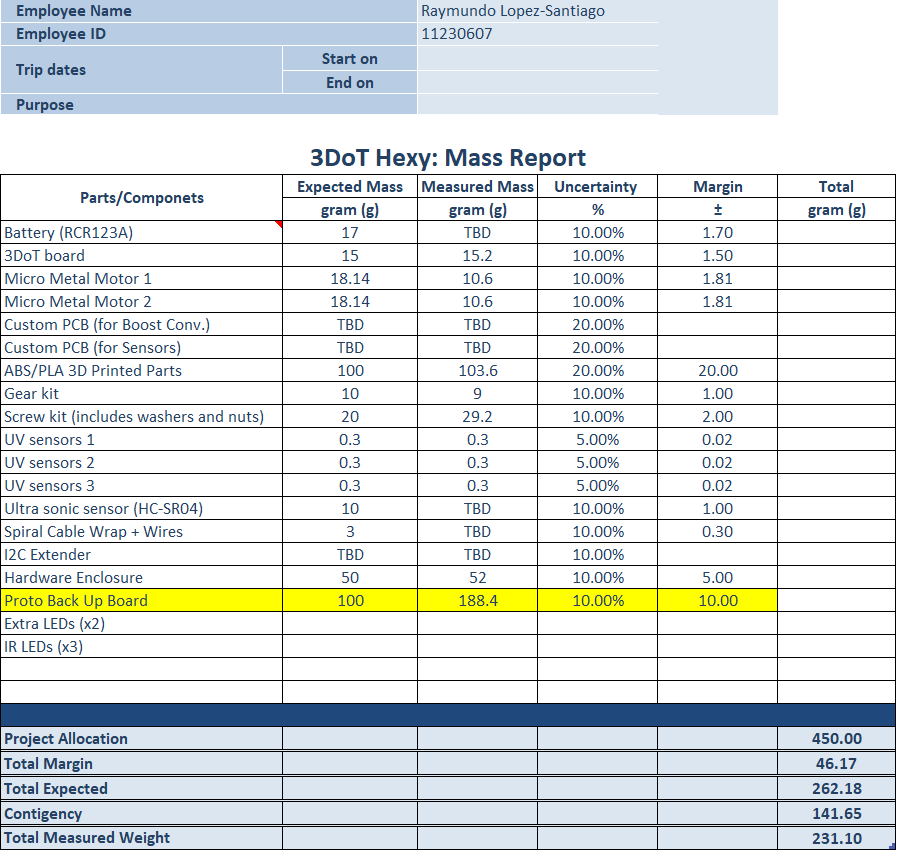 Fig. 1: Mass Report
For the mass report, the allocated mass for 3DoT Hexy is 450 grams. This is determined using different weights until the robot operated at 3.7V is no longer able to operate. See blog post (Mass Allocation Post). Most parts/components are measured, but values will be updated as needed. A small home digital scale is used to measure all mass for each part.
Power Report

Fig. 2: Power Report
For the power report, the allocated current comes from the battery used in this project which is 1100mA. This value is around 85% of the max current able to be supplied from the RCR123A battery. Values are initially estimated based on datasheets for minimum and maximum current draw f
or each device used. The maximum current draw is assumed to be worst case scenario and that is what is used for power estimates for each component. A section is included to compare the total expected current draw obtained from datasheets and total measured current draw. All measurements for current draw are done using a breakout current sensor.
Cost Report
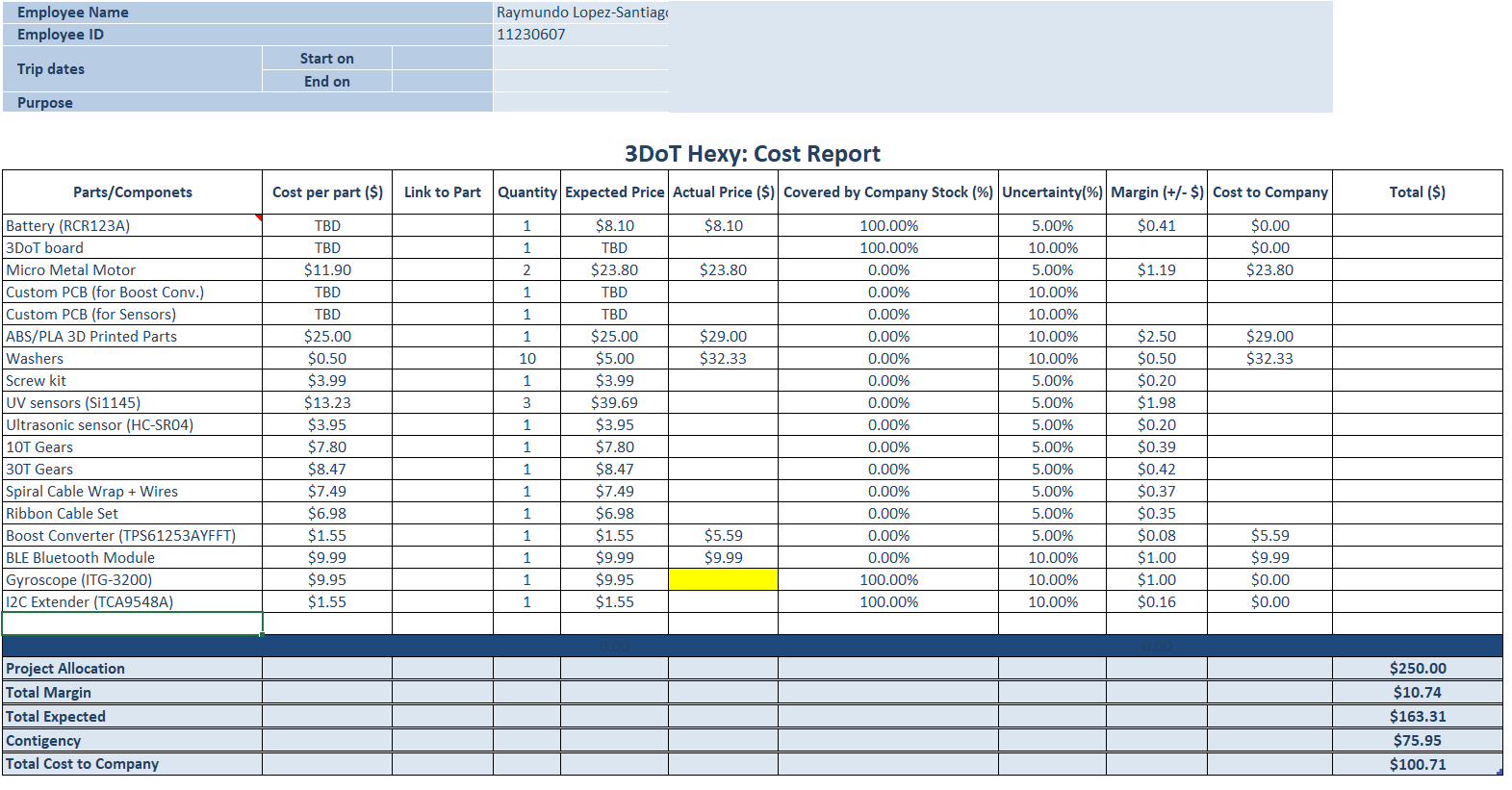
Fig. 3: Cost Report
For the cost report, based on customer requirement our project allocation cost is $250. At the moment we have got approval from the customer to allocate a max of $300 if needed. Most parts are already purchased, but values will be updated as needed. This table is covers all cost per part as well as provides links to all parts. A section added is to include parts covered by company stock. Even though some parts are provided, an expected price for those parts are included in the case someone else needs this information to know the total cost to build this robot. Total cost is broken up into cost covered by The Robot Company and expected cost from purchased parts.
Based on all spreadsheets presented in this blog post, we are in good shape to not exceed any parameters defined for each the cost, power and mass allocation. One recommendation is to start filling out all spreadsheets as soon as possible. Keeping up-to-date documentation will save a lot of time.
By: Eduardo De La Cruz (Project Manager and Manufacturing Engineer)
Approved by: Miguel Garcia (Quality Assurance)
Table of Contents
The purpose of this blog post is to demonstrate how all parts designed in Solidworks needed to be modified to have a functional prototype. In doing this blog post, we learned that different materials function better than other materials in certain situations. Specifically, in parts that experience a lot of movement and contact with adjacent parts.
Level 1 Requirement
After designing and testing our prototype, we saw that there were many areas that we could improve upon to make our design better. Areas such as the gear holding system and our gear-to-femur joints needed to be re-evaluated due to customer concerns with the prototypes design. Among other things, we also saw that most testing with the prototype was done flawlessly between 4.5 to 5V. However, due to the unavailability of the booster shield due to design constraints discussed in “Spring 2018 3DoT Hexy: Booster Shield Layout” . We will have to operate 3DoT Hexy at the battery rating of 3.7V. In order to achieve the same performance we were getting at 4.5-5V with 3.7V we will have to re-evaluate our current design and minimize friction between moving parts as much as possible. The professor had multiple ideas to make this possible, as well as other ideas to make our design better. Among them, the most promising ideas were to add bearings into the gear shafts, and add bushings to the gear-to-femur joints. Below are implementations of these suggestions, as well as other solutions we came up with to improve the performance of our design.
In order to improve our gear design’s performance at 3.7 V we decided to integrate bearings into the bores of our gear. This should improve performance while at the same time addressing one of the customers concern over the current machine screw design. The main issue addressed by the customer, was bore warping in the gears due to the machine screw thread being in contact with the plastic gear bore. We decided to integrate 3 mm x 6 mm x 2.5 mm bearings to the gear bores, which we outsourced from VxB bearings.

Figure 1: 3 x 6 x 2.5 mm bearings
How we did it
The bearing’s outer diameter was bigger than the bore diameter of the gears, so what we did was use a drill press to resize the bore holes. For better fitment, drilled boreholes were sized to the outer diameter of the bearings and forced in using a plastic hammer. We did this for all the gears.
 Figure 2: Installing bearings to gears
The gears were attached to the chassis of our spider using 16mm flat head machine screws, brass bushings, washers, and nylon lock nuts.
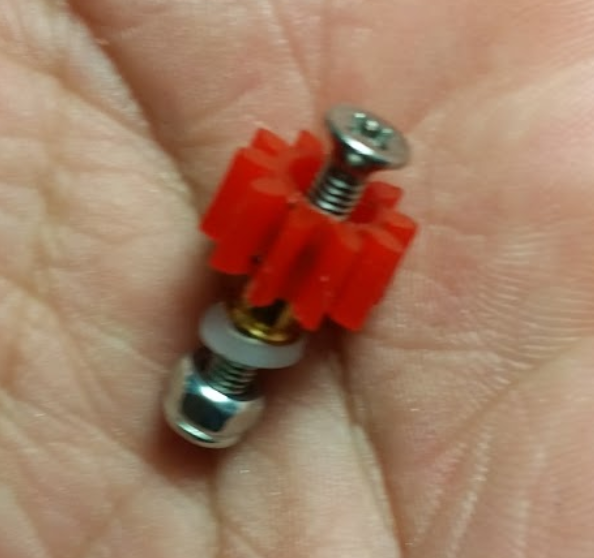
Figure 3: Gear Assembly
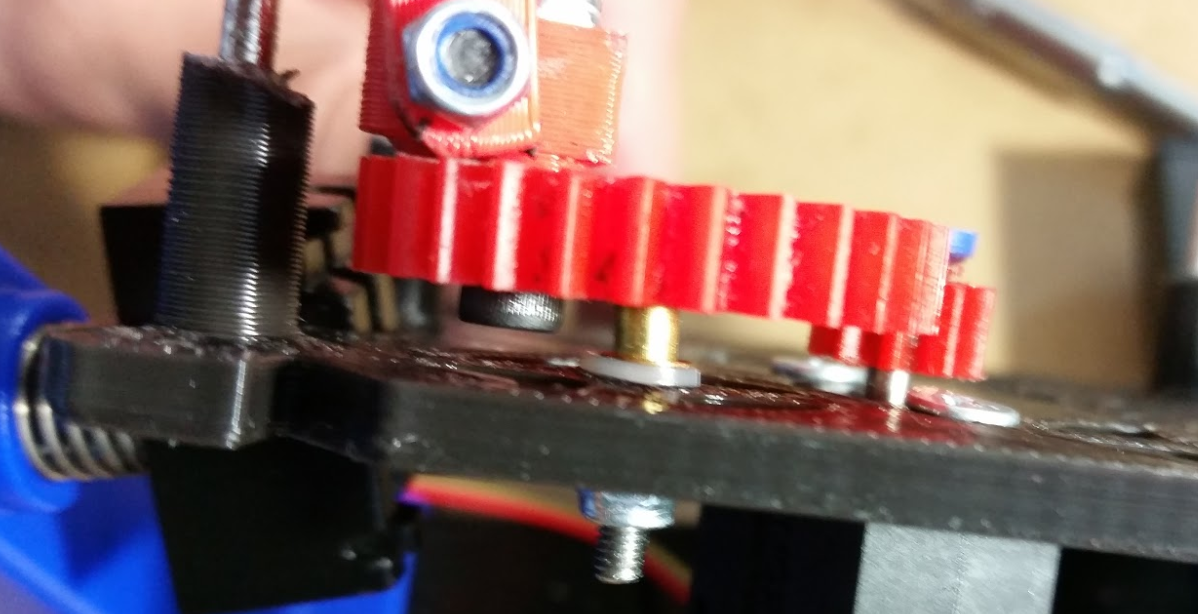
Figure 4: Gear Assembly
From the above figure, we can see that the brass bushing is used to pinch the bearing’s inner ring allowing only the outer ring to rotate.
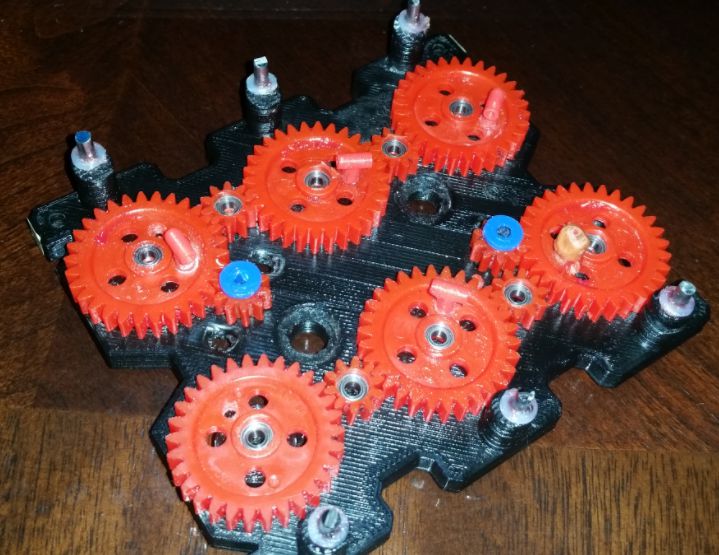 Figure 5: All bearings installed
The gear-to-femur joint design in our prototype was very flimsy due to having too much play. This play was coming from using cotter pins and from using screws to hold the joint to the gear. A solution the professor had was to add bushing to the holes and run machine screws and lock nuts to make a more sturdy joint. Manufacturing decided to pursue this solution because implementing this design solution would enables us to control the amount of play required to run our robot at 3.7 V. Nevertheless, implementing this solution requires redesigning the joint as shown below.
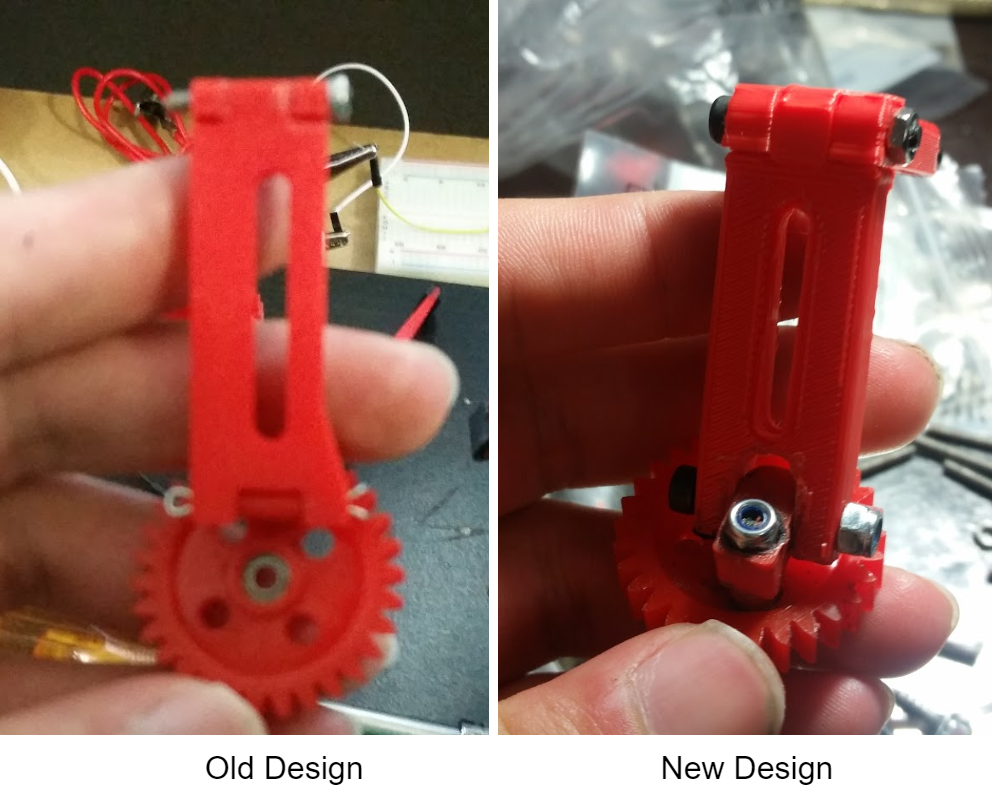 Figure 6: Old vs New Joint Design
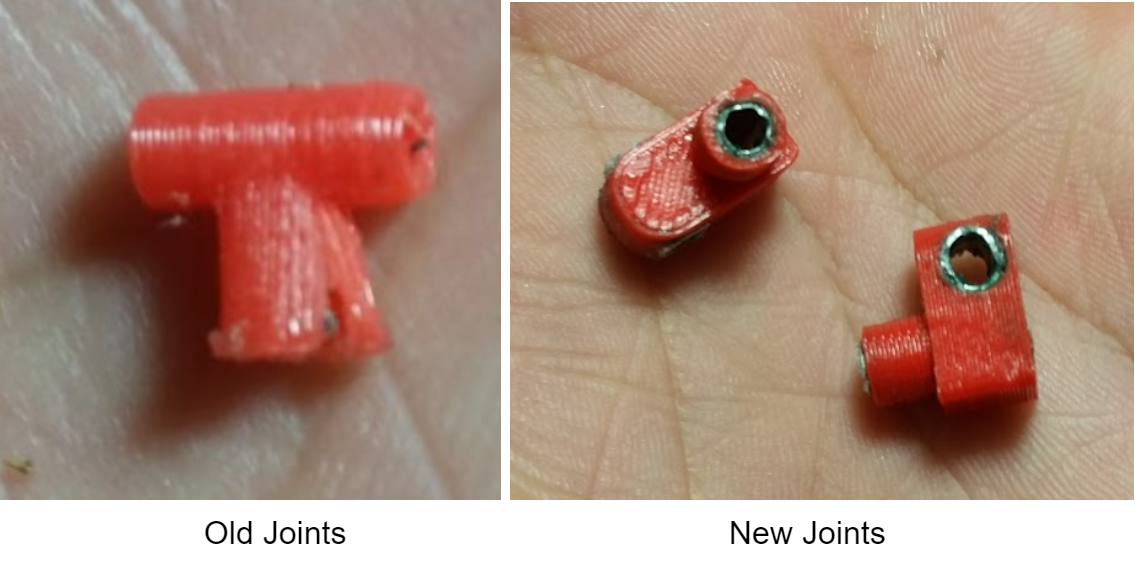
Figure 7: Closer look at old vs new joint
Dimensions for the new joints can be found by clicking here.
As can be seen above, the new design will have individual holes to provide the 2 degrees of freedom required by our design. Very small aluminum bushings were inserted into these joints. As advised by the professor, Mcmaster carr was the best place to go to find these bushings. However, due to being unable to find the desired specifications for the inner and outer diameter for the bushings (3 mm ID, 4mm OD), time and cost. The manufacturing department decided to make them himself since he has had experience in the past shaping metal. Using an aluminum sheet, the manufacturing engineer was able to make aluminum bushings that would fit into the hole of the joints within a few hours for testing.
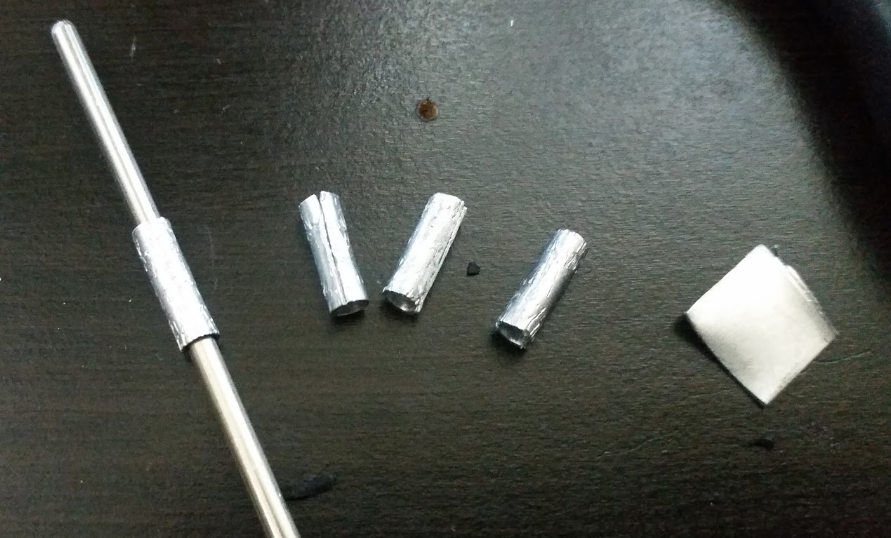 Figure 8: Making Aluminum Bushings
As shown above, making aluminum bushing is pretty easy, if you have the right tools. First,cut a piece of aluminum to the required perimeter length (C=2*pi*r). Second, shape the small sheet of aluminum into a tube using an aluminum rod and pliers. Three, cut excess material using wire cutting pliers or a dremel (if you have access to one). Sand and polish the tubes to remove all dents and to smooth the material.
Below is the final assembly of our new design. As can be seen the design looks more sturdy than our old design, because it is. The new joints are definitely much less flimsy than the old design, and can be adjusted by tuning the cap screws to the amount of play desired for best performance.
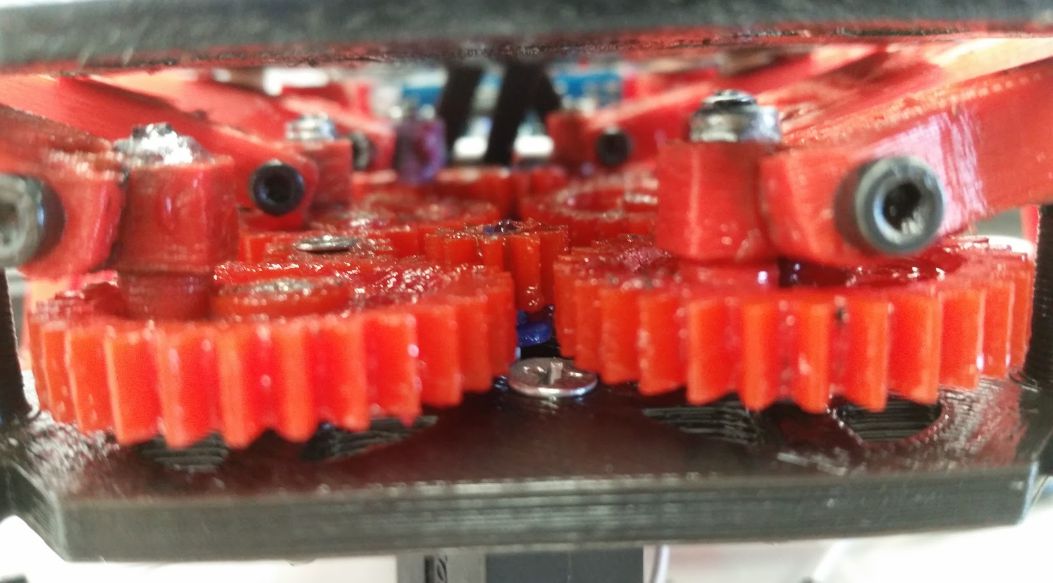 Figure 9: Final Assembly
All components mentioned in our 3D model blog post, for Hexy Mk-01, were fabricated using a 3D printer. Parts that needed to be modified were fixed using a power drill and a Dremel tool for: cutting, grinding, sanding, and shaping the material.
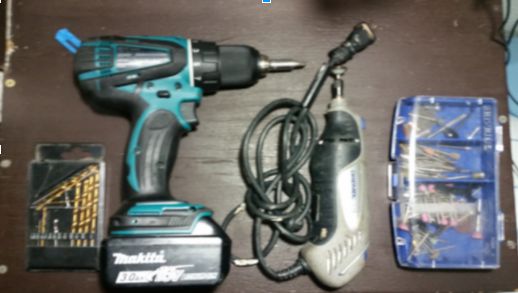 Figure 10: Power tools used
Removed all shafts
We removed all shafts from the bottom plate design because 3D printed. 3 mm shafts were very thin and fragile. The manufacturing engineer would have to constantly glue on the broken shaft pieces. A better solution for this is making 3 mm holes at the shaft positions and inserting 3 mm stainless steel rods for the leg guides. Similarly, gear holder shaft were replaced with 3 mm holes and will insert machine screws and nuts to hold the gears down. We also increased diameter of the wire holes by 2 mm using a dremel tool. Therefore, in the Solidworks file revision, all shaft extrusions will be converted to holes.
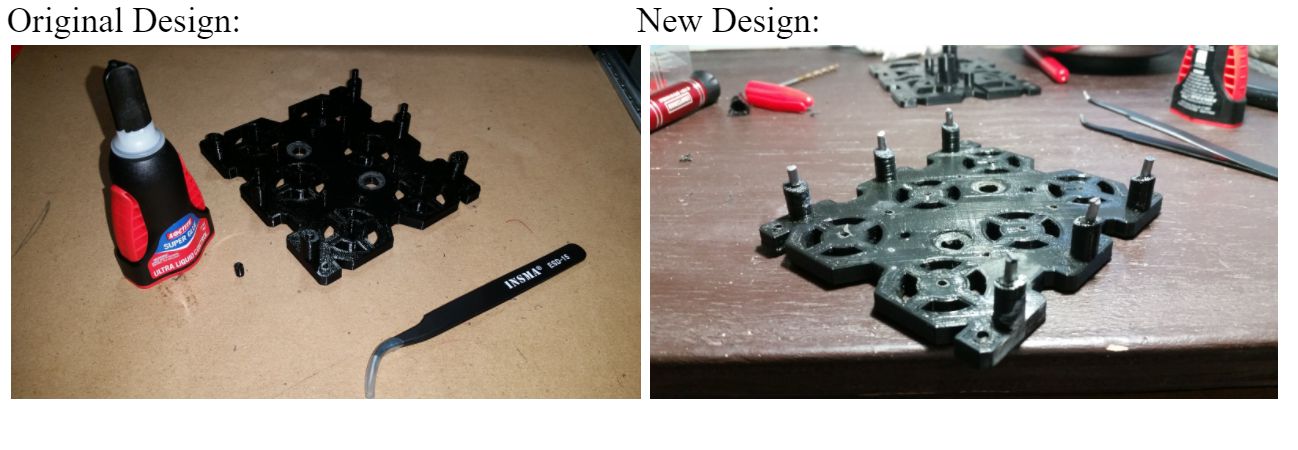
Figure 11: Replacing all shafts with holes
Added spacers to the base of all the leg shafts
This was done in order to raise the overall height at which the legs would rise.
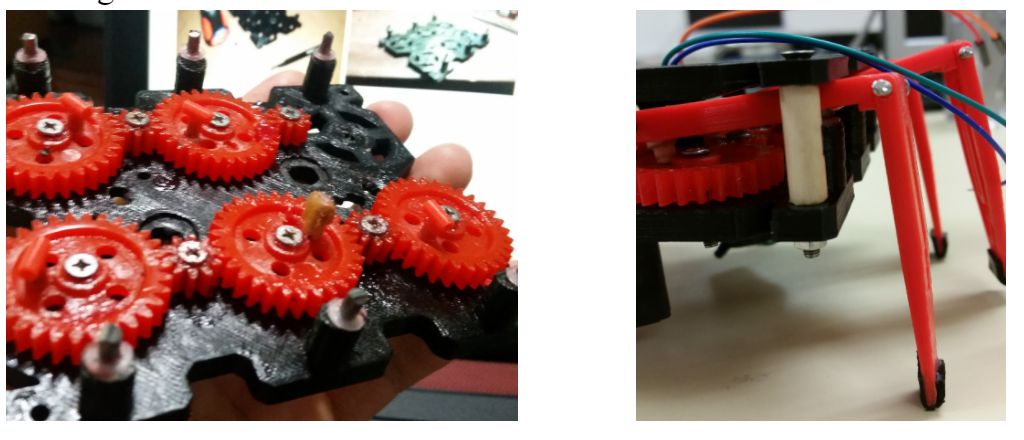
Figure 12: Added white spacers to shafts
Made holes for motors on the underside of the bottom plate
3 mm holes for motor boxes on the underside of bottom plate were added. This was done because the thickness of the bottom plate was preventing the motor shafts from having a good contact with the gears they connect too. Future revision of Solidwork files will require reducing the thickness of the bottom plate.
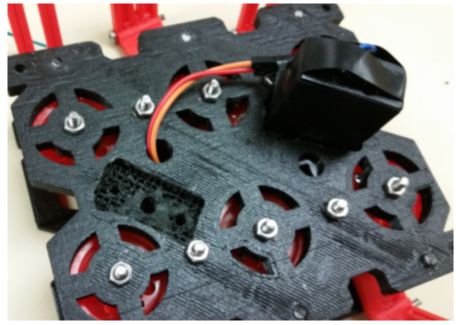
Figure 13: Adding holes to underside of bottom plate
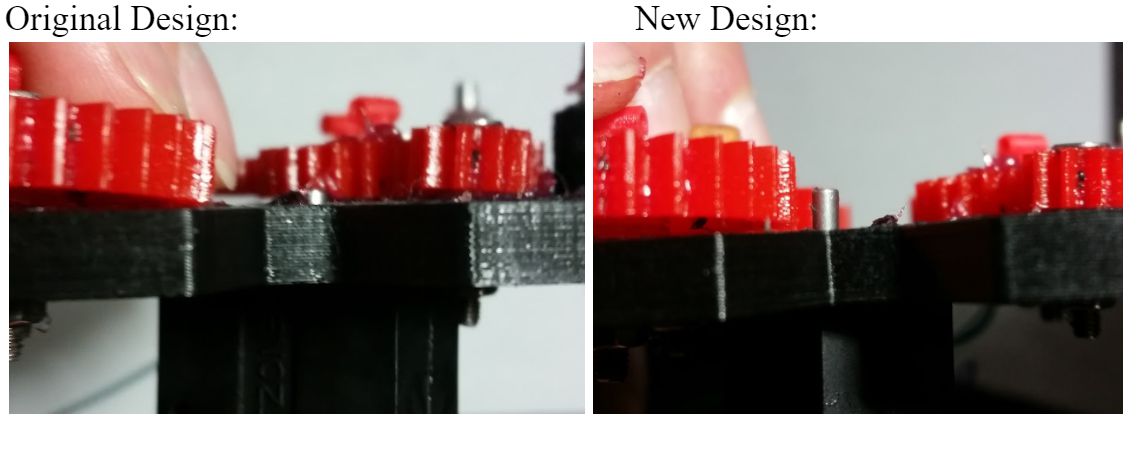
Figure 14: Left – original shaft clearance, Right – new shaft clearance
Modified Resting holes for leg guide shafts
The resting holes for the leg guide shafts were too small, so we had to increase the diameter of them by approximately 1.5 mm using a dremel tool.
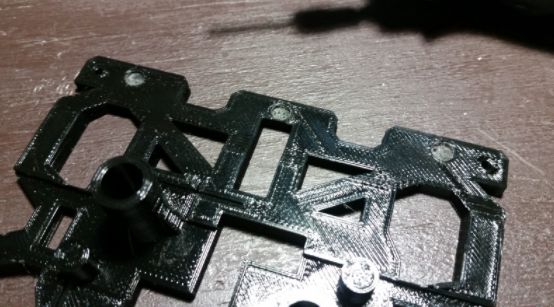
Figure 15: Modifying top plate holes
Sanded femur joint to tibia
Due to making the dimensions of the joint between femur and tibia the same size in both ends, mating the femur to the tibia was not possible. Therefore, the femur insert had to be sanded down using a dremel to enable the femur and tibia to mate correctly.
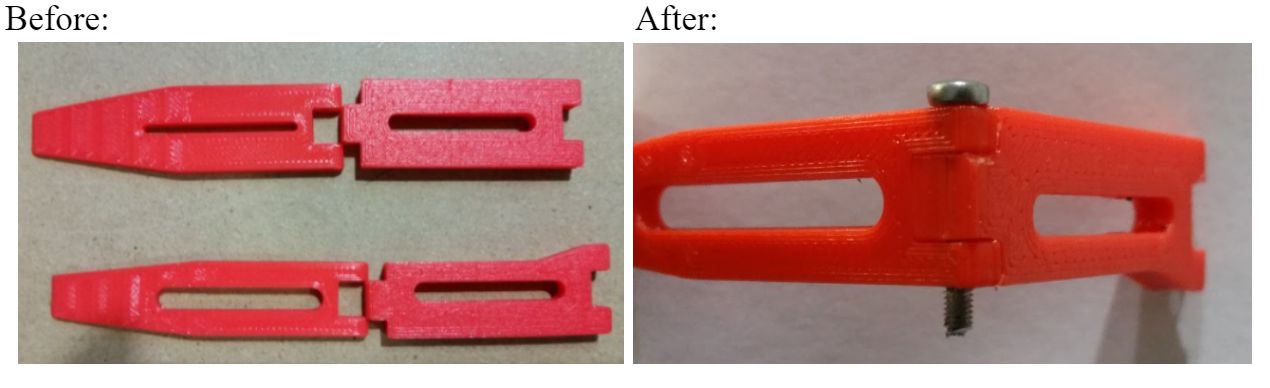
Figure 16: Before and after images of mating leg joint
Modified femur-to-gear joint junction
The edges on the underside of femur-to-gear joint junction were rounded. This was done because this end would tend to get stuck on the screw during rotation of the gear. We also increased the diameter of the hole to 2.5 mm in order to easily insert cotter pins
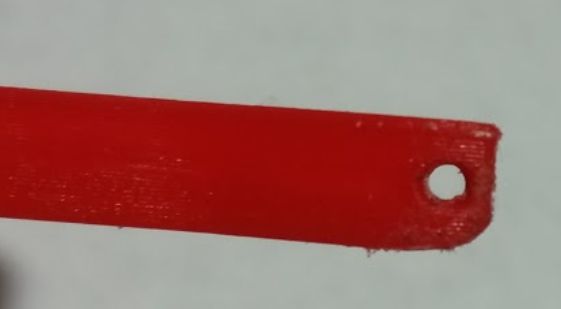
Figure 17: Modified femur edges and hole
Adding grip
The tibia designed would bond easily to femurs after femur joint was modified. The only issue discovered was that the current design of having plastic tips would make Hexy susceptible to sliding while walking. Therefore, we decided to glue thin 10 mm x 5 mm x 2 mm pieces of rubber to the tips of the legs to increase the grip Hexy will have while walking.
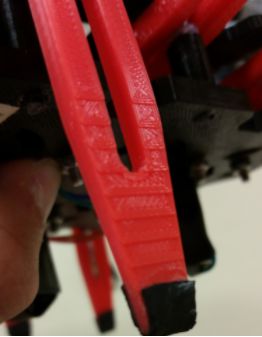
Figure 18: Adding grip to tips
Sanded junction between gear joint and femur
The same issue we had with the femur-to-tibia junction came up with the femur to gear joint. The dimensions of both mating points were designed with the same measurements causing them to not fit together as they should. The solution was to sand down the junction between the joint and the femur for better fitment.
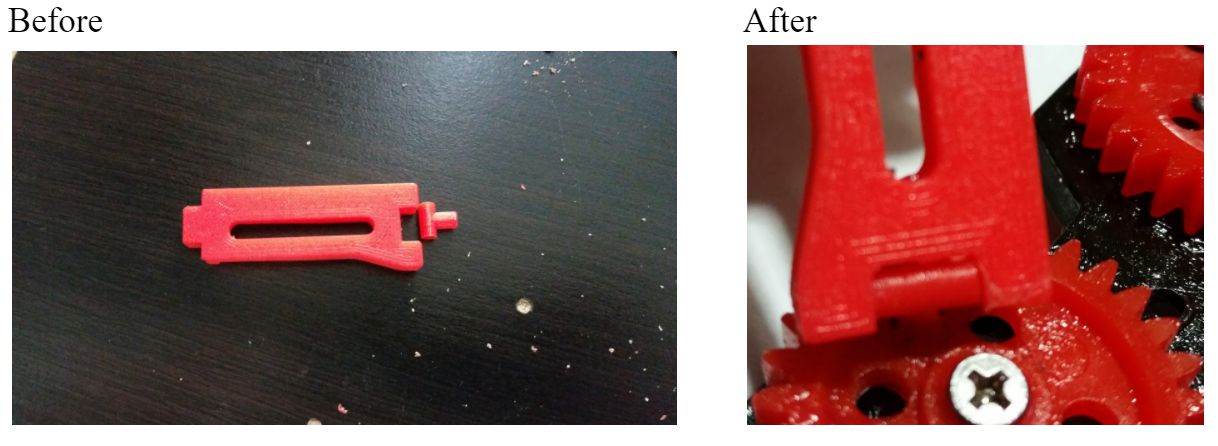
Figure 19: Adjusting gear joints for fitment
Added 2 mm holes on the gears in order to insert the screw that will hold the femur-to-gear joint in place.

Figure 20: Adding hole to gears
The current joint design was not very reliable. Do to the thin design of the borehole walls (where the screw is to be inserted), the joint would split open when a screw would be inserted. Liquid glue had to be added to the joint to hold it in place. Two solutions proposed by the manufacturing department were to either: redesign the joint and 3D print one with thicker borehole wall, or make them out of more durable materials, such as wood. Below is an image of a wooden joint fabricated by the manufacturing engineer. We will attempt to redesign joints to look like the wooden sample which is thicker. We might even try 3D printing them for easy manufacturing. If 3D printing these joints doesn’t work we will make them out of wood.
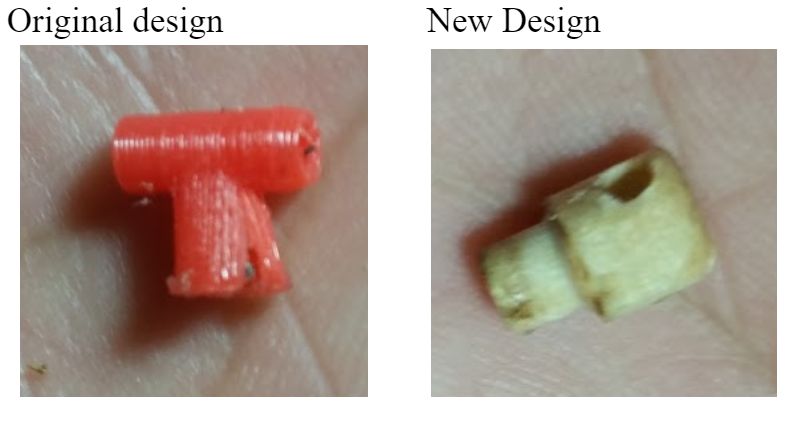
Figure 21: Two types of gear-to-femur joints
Four 20 mm spacers were fabricated out of wood tubes for this prototype and will be replaced by nylon spacers in a future revision.
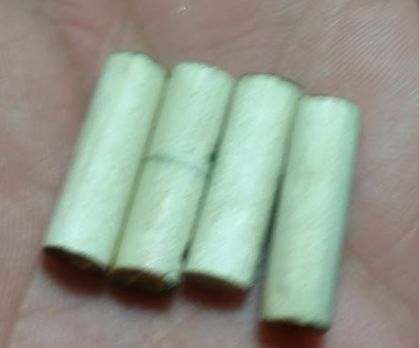
Figure 22: Wooden spacers
Our plan for making the connection between the 10T driving gears and the motor shaft is to do one of the following:
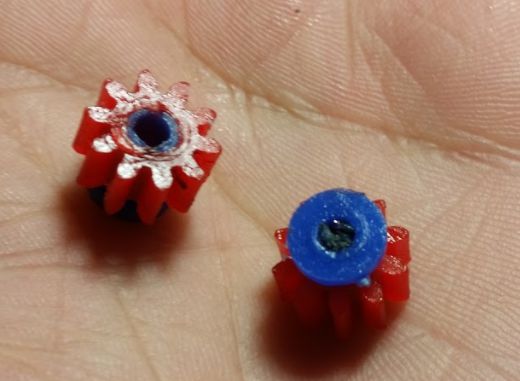 Figure 23: Method 1
 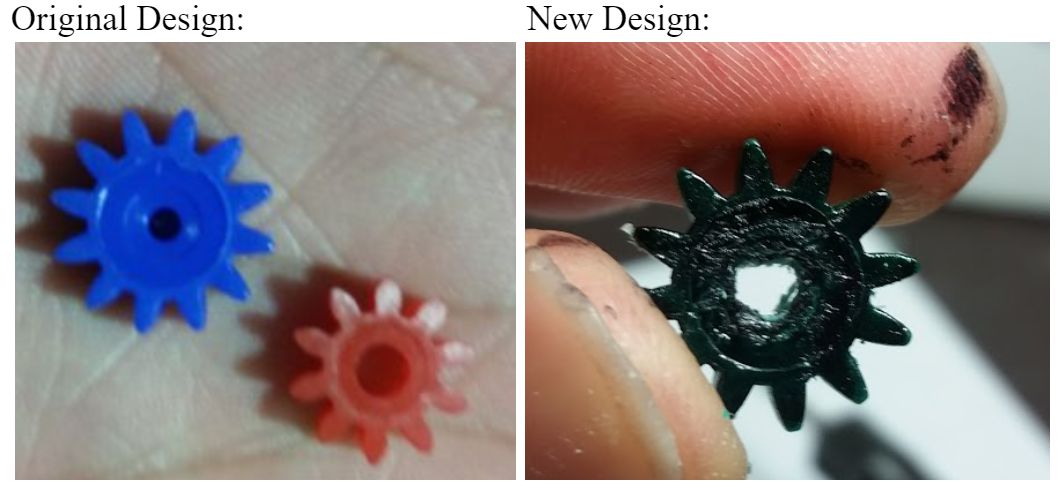 Figure 24: Method 2
 Both designs have been built and tested. From the test we saw that both methods work the same and don’t differ in performance when driving the motion of the cam system. We will use method A due to having the same gear color as the rest of the cam system, as well as for providing the least amount of play when inserted to the motor shaft. We will use method B as a backup in case we have issue with method A later in the design.